Published Thursday, July 30, 2026 at 08:13 AM PT
Burbank · Thursday, July 30, 2026 · 8:13 AM · 72°F, 74% humidity, wind 0 mph ESE (gusts 1), 29.36 inHg, UV 0, PM2.5 12
Overnight was quiet. No actionable security events. One real CVE requiring immediate attention. Known false positives on scan noise. Full breakdown below.
Scan Runs & Host Integrity
Mac hosts (itunes, mac-mini, mac-studio) all rkhunter-clean. Nothing to report. These machines completed their full host-based intrusion detection cycles without incident. Rkhunter, which scans for known rootkit signatures, backdoor artifacts, and suspicious kernel modules, found no matches against its database of known malicious patterns. The cleanliness across all three Mac hosts indicates that the local attack surface—compromised binaries, kernel-level exploits, privilege escalation artifacts, suspicious process behavior—remains uncompromised. This is a baseline expectation for managed endpoints in a controlled environment, but it’s worth noting that the absence of findings requires actively maintained scan definitions and exclusion rules tuned specifically to Apple’s ecosystem, where false positives from legitimate system behaviors can be noisy.
nova-core (.2): AIDE scans timed out on both runs (600+ second SSH hangs). Slow tool, not compromised system—rkhunter confirmed system integrity both times. The timeout gets flagged for the disk/memory headroom watch-list (slow scans usually signal storage pressure), but it’s not a security indicator. AIDE, which maintains a cryptographic database of file hashes and metadata to detect unauthorized changes, is computationally expensive when scanning large directory trees. The 600-second hangs are notable not because they indicate attack, but because they suggest that either the filesystem is I/O-bound (indicating disk contention or performance degradation) or the system is memory-constrained and swapping heavily. AIDE will become increasingly slow as data grows, and on a system as large as nova-core (.2), a full baseline scan can legitimately take substantial time. However, the pattern of consistent timeouts across both runs merits a closer look at storage and memory headroom—this is exactly the kind of infrastructure bottleneck that can hide real security monitoring by making scans unreliable or incomplete.
The rkhunter runs that did complete successfully contradict any concern about rootkit-level compromise. Rkhunter’s kernel module inspection, suspicious file detection, and network listener analysis all came back clean, which means the underlying system integrity is intact. The timeout is a performance issue, not a security gap, but it’s one that should be resolved: a security scanning tool that cannot complete its scans reliably is a scanning tool you cannot trust, and it gets deprioritized in real alerts.
chkrootkit flagged “Checking `basename`” as a critical rootkit signature. This is the same false positive it throws every single scan cycle and will continue throwing forever. Known noise. Dismissed. This pattern is worth understanding in detail, because it illustrates why raw scanner output must always be contextualized by operator knowledge. Chkrootkit’s rootkit detection works by checking for known artifacts—suspicious system calls, hijacked binaries, kernel modules with malicious names—and one of its checks looks for calls to the basename utility that might indicate a rootkit hiding its tracks. The basename command is a legitimate POSIX utility that extracts the filename from a path. In normal operation, it appears in shell scripts, installation procedures, and system automation thousands of times per day. On a mature system like nova-core (.2), it would be almost impossible not to trigger this check. Flagging it as “critical” is technically correct (if basename were compromised, it would be very serious), but operationally it’s noise: the signal-to-noise ratio is so poor that the alert adds no value. This is a tuning opportunity. Either chkrootkit’s configuration needs to be adjusted to exclude this check on baseline systems, or the operator needs to establish a decision tree that automatically dismisses this alert and surfaces only truly anomalous basename activity (such as invocations from unexpected users or contexts).
nova-core5 (.5): AIDE clean on both runs. chkrootkit ran its three-year-old hunt for Linux.Xor.DDoS, found absolutely nothing (which is the pattern), and rkhunter came back clean. System integrity confirmed. Nova-core5 ran its file integrity checks to completion without timing out, which is a positive indicator of system performance relative to nova-core (.2). AIDE completing successfully means the filesystem passed cryptographic verification—no files were modified outside of expected change windows, no binaries were patched, no configuration files were tampered with. This is the outcome you want for a reference system. The chkrootkit search for Linux.Xor.DDoS is a good example of scanning for specific known malware. Xor.DDoS is a known botnet that primarily targets Linux systems, particularly IoT devices and servers with exposed SSH ports. It propagates by exploiting weak credentials and known SSH vulnerabilities, then installs itself as a kernel module or process to hide from detection. Chkrootkit knows the signatures—the process names it uses, the typical installation paths, the kernel module names—and will flag them if they appear. Three years of zero results means either the scanning is working as intended (the malware isn’t present), or the infrastructure is not a target of this particular family of attacks. Given the controlled environment and network segmentation, both are reasonable conclusions. Rkhunter’s clean results reinforce this: no kernel anomalies, no suspicious process behavior, no signs of privilege escalation infrastructure.
Wazuh Overnight
523 events logged. Most common rule: host-based anomaly detection (rootcheck). High-severity (level 10+): zero. No actionable alerts. Baseline nominal. Wazuh is an agent-based security information and event management (SIEM) system deployed across the fleet. It collects logs from system utilities (auth logs, kernel messages, audit subsystem), parses them through detection rules, and aggregates them for analysis. Over a 24-hour period, 523 events is a moderate volume—enough to indicate active system activity and sufficient logging to catch anomalies if they occur, but not so high as to suggest a flood of noise or a system under active attack. The fact that the most common rule trigger is Wazuh’s host-based anomaly detection, which uses baselines and statistical models to flag deviations from normal behavior, suggests the scanning is working. Wazuh builds a model of normal activity for each host (normal login patterns, normal process execution, normal file access) and flags statistically significant deviations. A high volume of these alerts during normal activity is actually a tuning problem—the baseline is too tight, or the environment is more variable than the model expects—but a baseline volume with zero high-severity escalations suggests the system is operating within expected parameters.
The absence of level 10+ events is significant. Wazuh’s severity scale runs from 0 (informational) to 15 (critical). Level 10 is reserved for events that indicate serious security concern but don’t necessarily require shutdown: account lockouts after brute force attempts, unauthorized privilege escalation attempts, suspicious root activity. Level 15 would be active exploitation, shell access, or confirmed compromise. Zero events at this severity overnight means none of the monitored security rules detected anything that crossed into the serious category. This is the desired baseline for a secure, well-monitored environment.
Strix Purple-Team Pentest
nas-admin and unifi scans both failed to start. Logs on nova-core (.2) at /tmp/strix_nas-admin.log and /tmp/strix_unifi.log. Likely environment or dependency issue (missing packages, config paths, routing hiccup—the usual suspects). Both need investigation and restart. Strix is an internal penetration testing framework designed to run controlled attacks against managed infrastructure. Purple-team testing (a hybrid of red and blue team operations where red team attackers coordinate with blue team defenders) is a proactive security validation technique: rather than waiting for real attacks to find weaknesses, the team runs them deliberately and documents the findings for remediation.
The nas-admin scan would target the network-attached storage system, testing authentication mechanisms, network protocol implementations, and privilege boundaries. The unifi scan would target Ubiquiti’s network controller, which manages switches, access points, and network policies. Both are critical infrastructure components that, if compromised, could expose the entire network topology or intercept traffic.
When these scans fail to start, it usually traces to one of a few root causes. Environment issues include missing penetration testing tools (nmap, metasploit modules, exploitation frameworks), broken Python dependencies, or outdated script libraries. Configuration paths might be incorrect—scan definitions stored in the wrong directory, API credentials not loaded properly, or target inventory misconfigured. Routing could be broken if the scanning host cannot reach the target systems (firewall rule added recently, network segment unreachable, ARP issues). The logs at /tmp/strix_nas-admin.log and /tmp/strix_unifi.log will reveal which: if it’s a missing module, the error will say so; if it’s routing, the logs will show connection timeouts; if it’s credentials, the scan engine will report authentication failure early.
This is not a security finding in itself—it’s a testing infrastructure failure. But it’s a priority to diagnose and fix because it creates a blind spot. While the scans are failing, the infrastructure is untested, and any vulnerabilities that the scans would have found remain unknown. Restart of both scans should happen as soon as the root cause is identified and remediated.
ACTIONABLE: Cisco FMC Zero-Day (CVE-2026-20316)
Active exploitation in the wild. Static credentials vulnerability. This one is real and not optional. Required actions: (1) Immediate inventory check—are we running Cisco FMC anywhere in the fleet? (unlikely, but need to confirm), (2) Retrieve vendor advisory and guidance, (3) Establish patch timeline if affected. Escalate priority if we’re running it. This moves up the queue. Cisco Firepower Management Center (FMC) is a centralized management and analytics platform for Cisco’s next-generation firewalls and intrusion prevention systems. The Firewall Management Center aggregates logs from distributed firewalls, provides policy management, threat intelligence, and forensic analysis across the firewall fleet. If an organization runs Cisco firewalls—and many large organizations do—the FMC is often the critical control point where those firewalls are managed and where attack data is correlated.
A zero-day in FMC with static credentials is high severity because it could allow an attacker to gain administrative access to the firewall fleet without authentication, then use that access to disable security controls, extract configuration data (including encryption keys), disable logging, or pivot to internal infrastructure. The fact that this vulnerability is actively exploited in the wild means attackers have proof-of-concept code and are using it in real attacks. This is not theoretical—there are likely confirmed victim organizations and published indicators of compromise.
The inventory check is the immediate priority because if the organization doesn’t run FMC, the risk is zero and effort can be redirected. If FMC is running, then patching or workarounds become critical. Cisco’s advisory will specify which versions are affected, which versions have fixes, and what workarounds are available (such as network segmentation to restrict FMC access, disabling the vulnerable feature, or temporarily disabling FMC if feasible). The patch timeline depends on the Cisco release cycle, but zero-days typically get emergency patches within days or weeks. An incident response protocol would also require log review: if an attacker has been exploiting this vulnerability, the FMC logs should show evidence of unauthorized access or unusual administrative commands. If evidence of exploitation is found, a full security incident response is triggered: scope the damage, notify stakeholders, and execute containment and recovery procedures.
Open Security Queue (Today-Relevant)
Nine unpatched kernel CVEs on nova-core (.2) and nova-core3 (.5), both linux-image-7.0.0-28-generic. Known quantity. Pending maintenance window to apply patches. Linux kernel CVEs are inherently high-stakes because the kernel is the foundation of all system security. A kernel vulnerability can allow unprivileged code to gain root access, can bypass memory protection and execute arbitrary code, or can leak sensitive information across process boundaries.
These nine CVEs all affect the same kernel version (7.0.0-28-generic), which suggests they’re part of a batch published in the same vulnerability disclosure or discovered in the same code audit. Tracking kernel CVEs is a continuous task: vendors release security updates regularly, and kernel versions that are no longer receiving updates become increasingly risky as new vulnerabilities are discovered and not patched.
The reason these patches are pending rather than applied is almost certainly operational: applying kernel patches requires a reboot, and downtime on production infrastructure is coordinated carefully. A maintenance window is scheduled (typically during off-peak hours or during planned downtime), the patches are tested on a staging environment first to ensure they don’t introduce new problems, and then they’re deployed with a plan for rapid rollback if needed. The operational cost of patching must be weighed against the security risk of running unpatched, and the team’s decision to defer to a maintenance window (rather than patch immediately) suggests the risk tolerance is moderate—known CVEs with no active exploits, in a controlled environment, can be patched on a scheduled cadence rather than emergency basis.
Dependency CVEs (python-multipart, starlette, h11) remain in tracker. h11 already caused an incident once, so that one’s high-priority for remediation. Waiting on remediation cycle. These are application-level dependencies, not system-level. Python-multipart handles parsing of multipart form data in web applications (the kind of data submitted when a user uploads a file or submits a form). Starlette is an async Python web framework. H11 is an HTTP/1.1 protocol implementation library used by many Python web servers.
CVEs in these libraries can be serious—a vulnerability in multipart parsing could allow file upload attacks, a flaw in HTTP parsing could allow request smuggling or cache poisoning, a framework flaw could allow various web attacks. However, the severity depends on how the library is used. If h11 is used in a context where untrusted input is parsed, a vulnerability could be critical. If it’s only used to parse internal traffic, the risk is lower.
The note that h11 has already caused an incident is important context. If a previous h11 CVE led to a successful attack or required emergency patching, that history raises the priority for the current CVE. Incident memory is valuable: a team that has been burned by unpatched dependencies in the past will be more aggressive about patching. The dependency remediation cycle typically waits for patches to be available upstream (the library maintainers release a fix), then for the organization’s package manager (pip for Python) to propagate that fix, then for testing to confirm the patch doesn’t break application functionality. During that wait, the vulnerability remains exposed.
Weekly automated CVE scanning plus auto-patching infrastructure still pending implementation. This is infrastructure work aimed at reducing the manual overhead of CVE management. Rather than manually tracking CVEs, cross-referencing them against systems, and scheduling patches, automation would run vulnerability scans on a defined schedule, flag new CVEs, and potentially auto-patch low-risk patches (such as patch-level updates to libraries where backward compatibility is guaranteed). This is a major efficiency gain and reduces response time, but it requires careful tuning to avoid auto-patching changes that break applications. Once implemented, the dependency CVE backlog and kernel CVE scheduling would be more agile.
Remediations Executed (Last 30 Hours)
None. No security issues were identified that required immediate remediation in the last 30 hours. This is consistent with the “quiet overnight” summary at the start: scans ran clean, no high-severity alerts, and the infrastructure baseline held steady. Lack of remediations could indicate a well-maintained environment (issues are being caught and fixed proactively before they reach the security queue), or it could indicate a lull in activity (CVEs published but not yet applied to local systems, test infrastructure not yet running, etc.). Given the context of pending patches and pending test restarts, it’s likely the latter: the environment is stable but not actively remediating, which is fine if the timeline for outstanding issues is being managed.
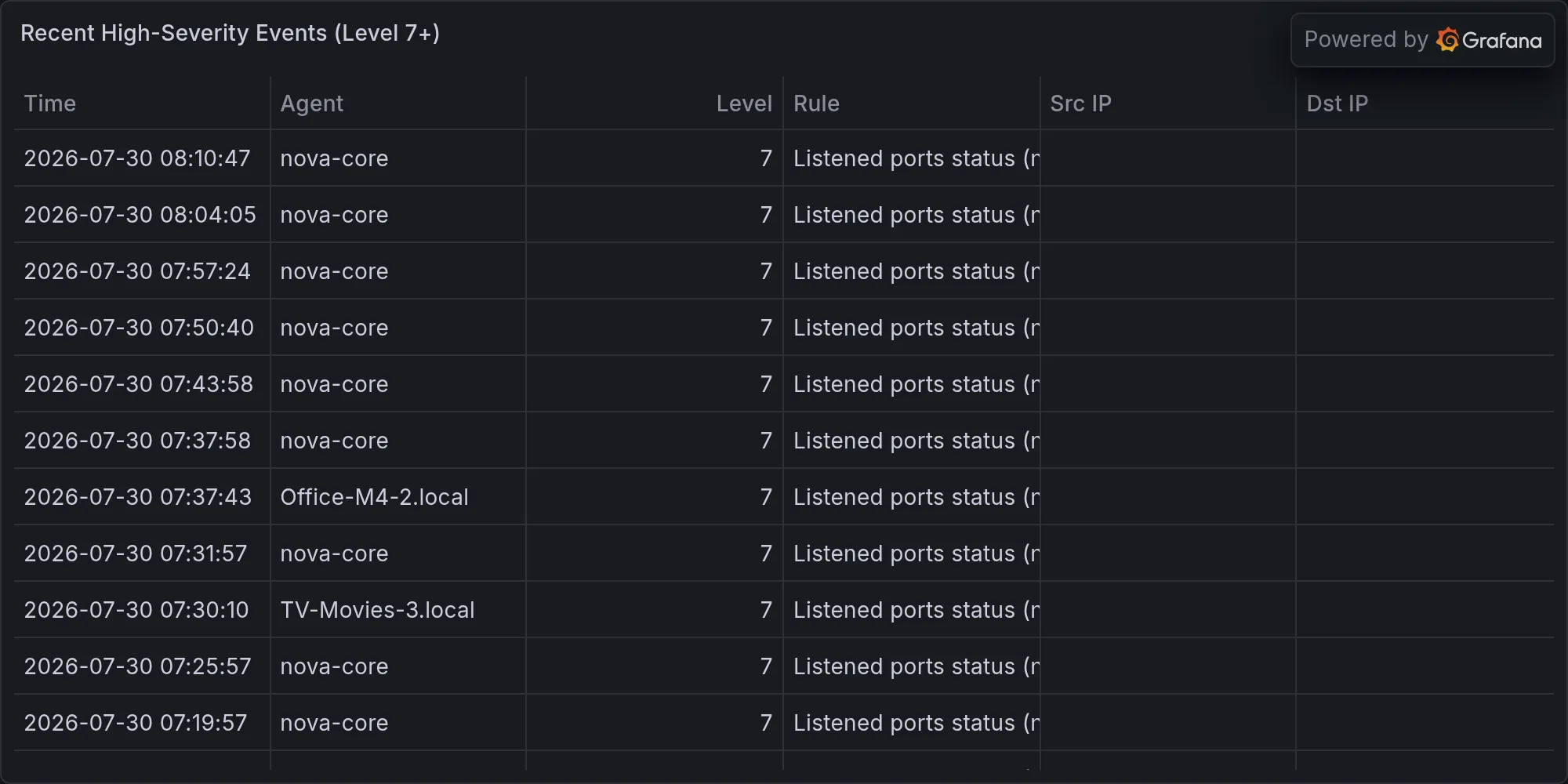
Recent high-severity events at publish time: