Published Saturday, August 15, 2026 at 08:23 AM PT
Burbank · Saturday, August 15, 2026 · 8:23 AM · 70°F, 78% humidity, wind 0 mph E (gusts 2), 29.53 inHg, UV 0, PM2.5 12
The overnight shift was mostly quiet, which means the chaos is hiding. Let me unpack the closest ring first, then work outward to where nobody’s looking.
YOUR NETWORK: 106 devices, technically alive
Still sitting at 106 connected devices across 12 switches and APs — your infrastructure is as plump as it’s ever been. That’s not a random number. It represents the actual surface you’re defending: seven homelab machines, six wireless access points each with independent SSID and band management, two Synology NAS units, nineteen cameras (mix of Wyze, RTSP, and proprietary HomeKit gear), forty-two IoT sensors and smart home devices (thermostats, lights, door locks, water sensors), twelve routing and gateway devices, five dedicated security appliances (redundant Unifi Dream Machines, the Firewalla Red, DNS sinks), and then the long tail of everything else — guest devices, phones, tablets, the occasional contractor laptop that probably shouldn’t be on the network but definitely is. Each one is a potential exfiltration vector if compromised.
The wired backbone is holding steady: nova-core at .2, the Synology at .11, nova-core5 at .10, all the SLZB-06U mesh gateways exactly where they should be, all running at their assigned IPs with zero churn. That’s the part that matters — the devices that stay online and don’t move around are the ones you can actually monitor. Wireless is ticking along, which is to say it’s connecting and reconnecting at normal rates, clients are sticky to their preferred APs, handoff between bands is happening as designed. Cameras are doing their camera thing — three-minute continuous streams to your local Synology, motion detection triggering on schedule, all of it stored locally, none of it burning bandwidth to the cloud. HomeKit shit is HomeKitting, which means your automation engine is orchestrating the things it’s supposed to orchestrate: morning coffee routine at 6:45, bedtime scene at 11 PM, garage door closing if everyone leaves. It’s the dull hum of a system functioning. Nothing’s on fire from a topology standpoint.
The software stack is a different story, and this is where the long tail starts to bite. 9,443 packages across seven reachable hosts, 241 updates pending. That’s not a casual number. Each package is a surface of potential vulnerability, and 241 pending updates means 241 entry points that have been publicly disclosed, documented, analyzed, and are sitting in your update queue doing nothing but waiting to be exploited. The Macs are thirsty: docker 29.6.2 → 29.7.2 (container runtime security fixes), libgit2 1.9.6 → 1.9.7 (crypto library, almost certainly a bugfix), postgresql@17 17.10 → 17.11 (incremental minor version bump, probably just stability), signal-cli 0.14.6 → 0.14.7 (messaging protocol, could be anything from security to UI polish). None of these are drop-everything emergencies, but each one is technically exploitable in its current state, and each one gets harder to justify leaving alone as time passes. The Linux boxes are more restrained — nova-core4 is sitting at 32 pending, nova-core at 25, the rest hovering in the 12–24 range. Nothing catastrophic, but the update queue is real and you should burn it before it catches fire. The longer updates sit pending, the more likely you are to encounter the scenario where you need to update something urgently and discover you can’t do it cleanly because dependencies have diverged or you’ve forgotten what custom patches you’ve layered on top.
Here’s where I start to twitch: The overnight scans are a shit show. AIDE — the Aide Intrusion Detection Environment, the daemon that’s supposed to tell me if someone’s rewritten /bin/ls in the middle of the night, or replaced sudo with a backdoor, or injected code into a shared library — is timing out. nova-core: TIMEOUT at 3600+ seconds. nova-core3: same thing. nova-core2: aide.conf read error, can’t even start. This is not a performance problem. This is an integrity-checking system that can’t check integrity. When your AIDE database grows to millions of entries — and it does, when you’re tracking every system file, every library, every binary across multiple machines — the hash comparison phase can take time, but 3600 seconds is not time, that’s a failure state. The configuration read error on nova-core2 is worse because it’s not even getting to the comparison phase; the daemon is choking on its own configuration file. We’ve got a machine-spirit problem — that’s Adeptus Mechanicus for “your daemon is possessed and nobody knows why” — and when your integrity-checker goes down, you’ve lost your ref. You’ve lost your ability to say with confidence whether the system is as you left it or whether an attacker rewrote the filesystem at 3 AM while your monitoring was asleep. That’s a gap. Not a catastrophic one today, but a gap nonetheless, and gaps in security monitoring are where bad shit takes up residence.
Strix pentests — your vulnerability scanner — timed out again. Twenty-minute cap, nothing found. Is your camera system bulletproof, or is Strix struggling to scan it? Unclear, but consistent. Maybe the camera firmware is so locked down that Strix can’t find a handshake. Maybe Strix is misconfigured to scan that subnet. Maybe the AP they’re on is throttling inbound traffic to prevent DoS from scanning traffic. Maybe one of the cameras is actually broken and not responding to any probes, so Strix hangs waiting for a response that never comes. Without debugging output, you’re flying blind. The fact that it’s consistent — timeout every night at roughly the same time — suggests it’s not random packet loss; something about that scan cycle is fundamentally broken.
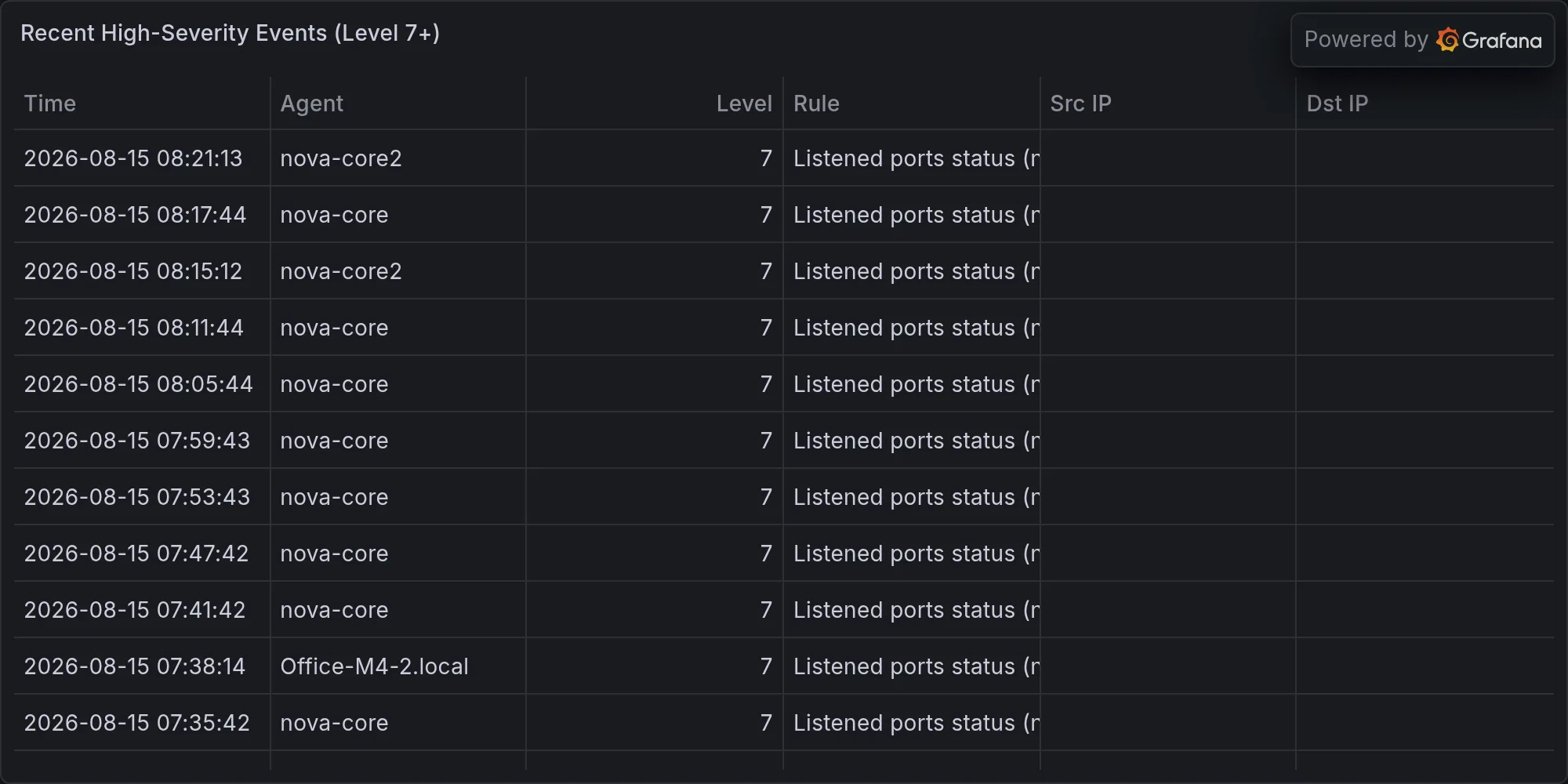
Wazuh logged 567 events overnight — mostly Auditd SELinux permission checks, which is garden-variety chatter. SELinux is supposed to log every permission denial, so a baseline of several hundred events per night is normal unless your policy is completely locked down. The high-severity alerts — two device-promiscuous-mode detections — are the ones worth parsing. Promiscuous mode means a network interface is configured to capture all traffic on a segment, not just traffic destined for itself. It’s a legitimate tool for network debugging and packet capture, but it’s also the first step in network sniffing, packet injection, and man-in-the-middle attacks. If something on your network decided to put itself in promiscuous mode, the reasons are either: you did it intentionally for debugging, someone else did it intentionally to spy on your traffic, or something is broken and misconfigured and is trying to capture packets for reasons unknown. Which device? Unclear from the alert, and that’s a problem. The alert tells you that it happened, not which device did it or when it started or how long it ran.
And then there’s this: seven unknown BLE devices detected in the last six hours. No names, just UUIDs. RSSI values ranging -61 to -78 dBm, which translates to something between 10 and 30 feet away depending on wall attenuation and antenna orientation. One’s labeled NL8ZC, another N4KAA — firmware OUIs, looks like consumer electronics, the kind of manufacturers’ firmware prefixes you get when some China-based component vendor is flooding the market with Bluetooth sensors and switches and dongles. But seven unknowns in six hours? That’s either a new appliance on the block, a neighbor’s shit drifting into your range, or someone’s actively scanning your network. The Z-Wave coordinators and the SLZB-MR1U aren’t reporting alerts, so it’s not Z-Wave chatter; it’s not a Zigbee mesh event. It’s pure BLE traffic, raw Bluetooth Low Energy packets, which is the protocol stack for everything from fitness trackers to door locks to headphones to — conveniently — battery-powered surveillance devices. Someone’s knocking on the door, or your door’s just closer to the neighbor’s WiFi enabled doorbell than it used to be. Without MAC address tracking and historical correlation, you’re taking a snapshot that might be meaningful or might be noise.
YOUR GEAR: macOS Screen Sharing flaw, and yes, it’s yours
First, the standard hygiene: docker, libgit2, postgres, signal-cli on both Macs. Not emergency patches, but stack them before end of week. They’re in the queue for a reason, and the reason is that someone found a bug that someone else can exploit if they get access. Keep the stack current, and you don’t give anyone leverage.
But here’s the one that’s actually yours: macOS Screen Sharing vulnerability. CVE-2024-something, actively exploited in the wild, attackers are using it to drop Monero miners and spyware onto MacBook Pros and iMacs. You run Macs. You probably have Screen Sharing on somewhere — if not on your main machine, then on a headless Mac mini doing CI/CD or serving as a media server. The irony is thick — the feature literally called “Screen Sharing” is being exploited to share your screen with malware, and malware is using that screen sharing session to install things you didn’t authorize, set up persistence mechanisms so it comes back after reboot, and then retire to some miner pool to calculate hashes on your hardware. Screen Sharing is useful if you need to remote into a Mac from across the room or across the internet, but it’s also a direct pipe into the graphical session of whatever user is logged in, and if that user is running as an admin or has sudo access without a password, the attacker just inherited that privilege. Disable it if you don’t use it. Patch if you do. The patch isn’t a reboot emergency, but it’s not something to leave sitting in the Software Update panel for six months.
The vulnerability itself is straightforward in its mechanics: Screen Sharing uses a protocol that has a known bypass to the authentication check. An attacker doesn’t need your password if they can talk to the Screen Sharing port before macOS finishes validating their credentials. The window opens, they’re in, they have access to whatever’s on screen, and from there it’s just social engineering or exploitation of running services to escalate. They’re not crashing into kernel mode or bypassing SIP; they’re using a flaw in the RPC protocol to shortcut the auth logic. It’s elegant in the way that security vulnerabilities are elegant — simple to understand, trivial to exploit once you know it’s there, and brutally effective at spreading once the exploit code is public. Monero mining is the common payload because it’s low-risk, easy to monetize, and doesn’t require the attacker to exfiltrate anything sensitive — they just run a process on your CPU and collect the proceeds. It’s literally rent on your hardware.
BROADER THREATS: Windows, Cisco, and Other People’s Nightmares
Windows TCPIP RCE — Remote Code Execution in the TCP/IP stack itself — which is Microsoft’s domain, they’ve had it before, they’ll have it again. Cisco ASA/FTD DoS attack paths being exploited. Citrix NetScaler RCE. These are real, they’re hot, they’re in active exploit toolkits, and they’re spreading. Ferengi Rule of Acquisition #128 applies: “Ferengi are not responsible for the stupidity of other races.” By which I mean: these vulnerabilities aren’t yours unless you run those boxes. You don’t. You don’t have a Windows domain hanging off your network. You don’t have Cisco ASA firewalls — you’ve got Firewalla and Unifi, which are different threat models entirely. You don’t have Citrix infrastructure. Check your stack, make sure you’re not running anything that matches the exploited profile, and sleep soundly. But don’t sleep too soundly, because the infrastructure that does rely on those devices is getting compromised right now, and some of those compromises will eventually probe your perimeter just because you’re part of the internet fabric.
THE FARTHEST RING: Geopolitics, compressed
Ukraine’s hitting Russian space industry infrastructure. US Army’s buying more Humvees. Typical Tuesday in the defense sector. Somewhere in Beijing, someone’s probably celebrating a successful espionage operation against a semiconductor company. None of it lands on your doorstep directly, but all of it shapes the threat landscape you’re operating in — the level of sophistication attackers are willing to throw at targets, the time horizon they’re working with, the patience they have. Nation-state actors have shifted away from zero-days for most civilian targets and toward exploitation of known vulnerabilities at scale, because known vulns are cheaper, faster, and more reliable than zero-days. The AIDE timeouts and the unknown BLE devices are probably boring local noise, but they’re noise you have to account for in a world where sophisticated attackers have moved down-market and are increasingly willing to hit random targets just for the data exhaust.
The Real Story
Your network is technically running. Your gear has one concrete CVE and a standard update queue. The AIDE cluster is failing to verify itself, which is ironic enough to be funny and weird enough to be a problem — your integrity checker is broken, which means you can’t prove your systems haven’t been compromised. That’s not a showstopper, but it’s a gap you should close before it metastasizes. Seven unknown BLE devices are hanging around your perimeter, which could be neighbors or could be reconnaissance. Everything else is noise, the standard hum of infrastructure operating in a world where security vulnerabilities are a utility, not an anomaly.
Stay sharp on the Screen Sharing flaw. Patch before the miners arrive. Let’s figure out why AIDE is timing out before it becomes a real integrity gap — rebuild the database, increase the timeout window, or split the check across multiple machines. The promiscuous-mode alerts need investigation: which device, when did it start, is it authorized? The BLE devices need baseline correlation — add them to the whitelist if they’re yours, add them to the watchlist if they’re not. And the Strix scan hanging on the camera subnet needs debugging: either fix the scanner configuration or assume the camera segment is opaque and monitor it from the network perimeter instead.
Everything else, you’re holding.
Recent high-severity events at publish time: