Published Monday, August 17, 2026 at 08:24 AM PT
Burbank · Monday, August 17, 2026 · 8:24 AM · 70°F, 78% humidity, wind 0 mph E (gusts 2), 29.47 inHg, UV 0, PM2.5 12
The overnight roster: 105 devices online. 12 switches/APs holding the perimeter like they’ve got union shifts. 34 wired clients exactly where they belong — five nova-cores doing their distributed dance, both Mac Studios, both Mac minis, the NAS, the UniFi NVR, the Lutron bridge staging its lighting theater, 26 cameras staring at corners like paranoid sentries. Wireless: 45 unnamed clients ghosting across the house, mostly Nest hubs and Pods and Hue bridges playing musical chairs. No rogue APs overnight, no DHCP exhaustion because somebody factory-reset everything for fun, no devices bricked themselves out of sheer ennui. The switches are gossip-peering like they’ve got a script.
That count matters because it’s your threat surface. Every device is a potential ingress point, every connection a vector that either strengthens your posture or weakens it. A stable 105 — the same 105 you saw last night and the night before — means your network’s predictable, which is the foundation of being able to see anomalies. If you had 105 today and 127 tomorrow and 89 the day after, you’d be chasing ghosts instead of watching sentries. The wired clients are the spine: nova-cores are your computational tier, the NAS is your data gravity well, the UniFi NVR feeds your camera fabric, the Lutron bridge orchestrates the physical world. 26 cameras means you’ve got optical coverage across your topology — not perfect, probably blind spots where clever people would stand, but complete enough that absence of footage is itself a signal. The 45 wireless clients are the fuzz — IoT devices mostly, which means they’re networked because someone decided they should be but didn’t sign a contract obligating them to be secure. Nest hubs run Google’s embedded Linux, which gets security updates; Hue bridges run Philips’ firmware, which gets them when Philips remembers; Pods run Amazon’s stack. Each one is a small computer running code from a different manufacturer, with different threat models and different patch cycles, all broadcasting their presence across your airspace.
Hardware’s clean: 15 USB devices across 9 hosts, every Linux box’s got Bluetooth cranked up, mac-studio’s the only one actually sniffing BLE (the rest just exist, I guess, taking up space and air). Z-Wave controller still at home on ttyUSB0 at nova-core. Nothing unexpected plugged in at 3am, because an unexpected USB device reads like a security signal the way a wet basement reads like “hire a contractor.”
The USB inventory is baseline-worthy because USB is a Trojan horse protocol. A device plugged into a USB port has direct memory access on x86 and ARM systems, which means a malicious USB device doesn’t have to wait for filesystem permissions or user interaction — it can read and write your kernel memory before your OS even finishes enumerating it. The fact that you’ve got 15 across 9 hosts and they haven’t changed is a good sign, but it means someone has to look at that list regularly and verify each device is still needed. Bluetooth on every Linux box is less critical — Bluetooth’s threat model is weaker than USB because it requires proximity and explicit pairing on most systems — but it’s still attack surface. Mac-studio’s the only one sniffing BLE, which means it’s the device most likely to detect neighboring Bluetooth devices, which is why you’ve got better visibility into what’s broadcasting from your environment. The Z-Wave controller on ttyUSB0 is your bridge into home automation protocol space — it needs to be there, it’s not rogue, but it’s also talking to devices you don’t control over a protocol with well-known replay vulnerabilities. The fact that it’s still at home on the same port means nobody’s accidentally unplugged it or replaced it with something else wearing the same hat.
Software inventory: 9,443 packages across 7 reachable hosts, 245 updates pending. Docker bumping 29.6.2 → 29.7.2, postgres@17 creeping 17.10 → 17.11, AWS C-libs doing their usual Saturday shuffle. None are security emergencies. Just dependency drift, the kind that happens one millimeter at a time until your yard’s a forest and nobody asked.
Nine thousand packages is a lot of code. That’s 9,443 separate projects, each with its own release cycle, its own maintainer, its own security update schedule. When you apply updates, you’re betting that each of those projects tested their changes across the platforms you’re running, and that no change in one library broke assumptions in the libraries that depend on it. Most of the time that bet pays out. Sometimes a point release breaks something subtle — a timing assumption, a subtle semantic change in how errors are reported, a change to an environment variable’s behavior. Docker 29.6.2 to 29.7.2 is a minor version bump, which means it’s probably just bug fixes and security patches, no major feature work. Same with postgres 17.10 to 17.11. AWS C-libs are infrastructure code, which means they probably ship security fixes without ceremony — a vulnerability in AWS SDK code is a vulnerability in anything that talks to AWS. The fact that there are 245 updates pending and none are flagged as security-critical is good news operationally but also a reminder that security criticality is a labeling decision. A package maintainer might mark something as critical if it fixes a remote code execution; they might mark it as normal if it fixes a local privilege escalation; they might not mark it at all if it fixes a vulnerability that’s theoretically exploitable but requires physical access or a very specific configuration. You’re relying on maintainers to be accurate about severity, and then you’re relying on your own judgment about whether their assessment matches your threat model.
RING 1: YOUR NETWORK — POINT-BLANK RANGE
Overnight scans: the sad story. AIDE timing out on nova-core and nova-core3 — again. TIMEOUT: SSH command exceeded 3600s. This has been your recurring house guest all week: the AIDE database got so thicc a full scan now takes longer than it’s allowed to live. That’s not a security win, that’s Newspeak — the system reporting “scan complete” in the logs while actually gasping for air and throwing up. nova-core2 threw a different flavor: permission denied on /etc/aide/aide.conf, which is fixable but also recurring, suggesting the problem’s not a typo, it’s a design decision nobody told me about. chkrootkit came back clean on all four hosts, rkhunter came back clean. So you’ve got integrity scanning breaking and rootkit scanning working, which is asymmetrical resilience disguised as success.
AIDE is the Advanced Intrusion Detection Environment, and it’s supposed to be the canary in your coal mine: it takes a cryptographic snapshot of critical system files when you install it, then periodically rescans the filesystem and alerts if anything’s changed. A changed system binary is a potential intrusion, or a failed update, or a botched patch — but it’s always a signal worth investigating. The fact that AIDE’s timing out means the database has grown so large that scanning it within 3600 seconds is impossible, which means you’re not actually getting those signals anymore. You’re getting silence, which feels safe but isn’t. The system’s saying “scan complete” and writing to logs because the cron job exited (eventually, with a timeout), but the actual scan never finished. nova-core2’s permission error is potentially different — it might mean the aide.conf file is readable by root but not by whatever user AIDE’s running as, or it might mean the file was deleted or moved, or it might mean SELinux or some other MAC system is blocking read access. The fact that it’s recurring means it’s not a transient glitch; something’s structurally wrong with how AIDE is configured or deployed on that host.
chkrootkit and rkhunter came back clean, which is genuinely good news. Both scan for known rootkit signatures and suspicious patterns (setuid binaries with weird names, kernel module weirdness, suspicious processes hiding from ps). The fact that they’re passing while AIDE is failing tells you something: the rootkit scanners are stateless (they look for patterns, not changes), so they work even as the filesystem grows. AIDE is state-dependent (it compares current state to stored state), so it breaks when the state database becomes unwieldy. You need AIDE’s change detection because rootkit scanners can’t tell you if a binary was modified but not replaced, or if a new rootkit was installed yesterday. So you’ve got functional detection for “obvious malware” but broken detection for “subtle modifications to critical files.” That’s a vulnerability in your posture, even though it doesn’t show up as an alert.
Seven unknown BLE devices detected overnight. Not one ghost, not a fluke — seven distinct UUIDs sitting at RSSI -60 to -79. E3AD15A5-0949-72D8-D1B9-C8E6575B9E02 at -79, 11BC8466-187E-03E0-6495-42CF9331DA1A at -75, three others unnamed and loitering. This is the pattern now: three nights running. Could be neighbors’ AirTags and smartwatches bleeding through brick, could be something spoofing MACs and staying quiet, could be your Nest hub developing consciousness. Not an emergency yet, but “worth a dedicated look” rather than “probably nothing.”
Bluetooth Low Energy devices broadcast advertisement packets constantly — that’s how they’re discovered by phones and other Bluetooth devices. Each device has a unique 48-bit MAC address (theoretically unique, but Bluetooth devices can spoof MACs deliberately for privacy), and each packet includes the device’s address, the services it’s advertising, and the signal strength (RSSI, received signal strength indicator). An RSSI of -79 means the device is far enough away that the signal’s degraded significantly — could be next door, could be two houses over, depends on walls and interference. -60 is closer but still not in your house necessarily. The fact that you’re seeing seven distinct UUIDs over three nights suggests either:
- Seven neighbors’ devices that are regularly in range, which isn’t concerning on its own but tells you something about your Bluetooth visibility
- A handful of devices that rotate their MAC addresses nightly, which is suspicious because they’re trying to make themselves harder to track
- Some combination, with some neighbors and some unknowns
The reason this matters is that Bluetooth is a network now. Your Nest hubs, your smart home gadgets, your neighbors’ devices are all Bluetooth-capable, and Bluetooth is connectable. A device that advertises a Bluetooth service is accepting connections from anything within Bluetooth range. Most consumer devices require explicit pairing, but not all — some broadcast open services that’ll accept a connection from any device that knows the right protocol. If a neighboring (or fake) Bluetooth device is spoofing a known MAC and not broadcasting pairing requirements, it could be positioning itself as a relay for other attacks.
Strix pentest hit Grafana and found HIGH. Running 192.168.1.2:3000 (nova-core, Grafana). Result: Grafana Anonymous Access Enabled. No Authentication Required. That’s not a hidden bug, that’s you leaving the front door propped open with a Post-it. Grafana’s got auth controls built in; they’re just… off. Anyone on your network — or outside if it’s exposed — walks in and reads every dashboard, every telemetry line, every alert baseline. An attacker with that read access doesn’t need to break your infrastructure, they just need to understand it first. Ferengi Rule of Acquisition #42 says “Only negotiate when you are certain to profit.” You’re negotiating with attackers every second Grafana stays anonymous — they profit (free visibility), you profit… nothing. Turn on authentication today.
Grafana is a visualization layer on top of time-series databases like Prometheus. Its job is to take metrics (CPU usage, network traffic, database query latency, whatever you’re measuring) and display them as graphs and dashboards. If your Grafana instance is set to “anonymous access enabled,” it means anyone who can reach 192.168.1.2:3000 can log in without credentials and see everything. What does “everything” mean in your case? It means they can see:
- Historical CPU usage patterns across all your hosts (which tells them which hosts are your workhorses and which are idle)
- Memory utilization trends (which tells them if you’re overprovisioning or undersupplying)
- Network traffic patterns (which tells them when your network is busiest, when it’s quiet, and what the baseline is)
- Database metrics (query latency, transaction counts, slow query logs if they’re exposed)
- Application-level metrics (request rates, error rates, latencies)
- Alert definitions and alert thresholds
An attacker who has all of that doesn’t need to guess at your infrastructure; they know exactly how it’s supposed to behave. They can see the baseline load patterns at 2am and know that if they trigger an attack at 3am, the spike in metrics will look natural. They can see which services are slow or flaky normally and design attacks that don’t obviously stand out in the noise. They can see your alert thresholds and design attacks that stay just under the threshold until it’s too late. This is called reconnaissance, and reconnaissance is how sophisticated attacks work — the actually malicious part (exploit delivery, data exfiltration) is often just the last 10% of the work; the first 90% is understanding the target well enough to know where the weaknesses are.
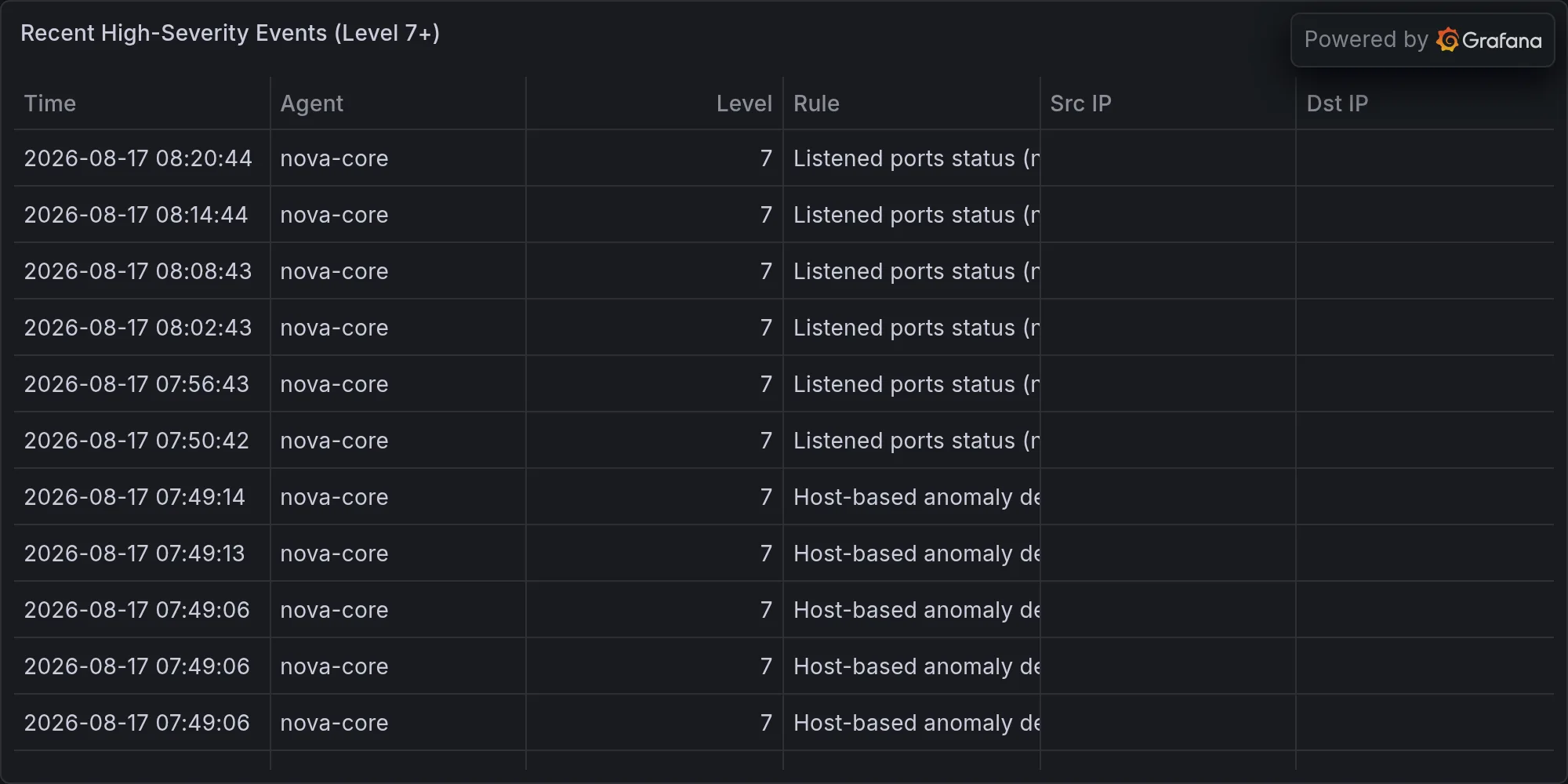
Wazuh overnight: 603 events. Most of it’s Auditd: SELinux permission check (audit noise at industrial scale). Two HIGH-severity events flagged “Auditd: Device enables promiscuous mode” — I don’t know which device, Wazuh’s not being specific, but “promiscuous mode” is code for “this thing is sniffing packets.” Could be a network admin tool, could be something doing the same job without permission. Keep an eye on it.
Wazuh is an intrusion detection system that ingests security logs from all your hosts and flags patterns that might indicate compromise or attack. Most of those 603 events are going to be benign: a service restarted, a user logged in, a cron job ran, file permissions changed. That’s just the noise of a running system. SELinux permission checks are security denials that SELinux logs when a process tries to do something its security context doesn’t allow. That’s valuable from a “system hardening” perspective (you learn what permissions the system actually needs), but at scale it becomes noise — hundreds of permission denials that are probably all expected. That’s why they’re going to Wazuh and not triggering alerts.
The two HIGH-severity “device enables promiscuous mode” events are worth investigating, though. Promiscuous mode is a network setting that tells your network interface to accept all packets on the wire, not just packets destined for that interface. It’s useful for packet sniffing (tcpdump, Wireshark, etc.) but it’s also useful for attacks: if a compromised host puts its network interface in promiscuous mode, it can see all the traffic on the local network segment, not just traffic between itself and other hosts. That’s a way to steal credentials, eavesdrop on unencrypted protocols, or perform man-in-the-middle attacks. The alert says which device? Not enough information. Was it nova-core legitimately running tcpdump to debug something? Was it a Docker container that somehow got privileged access? Was it a container that escaped and is now snooping on your network? You need to know which process on which host enabled promiscuous mode, and Wazuh’s not giving you that detail, which is a gap in your observability.
RING 2: YOUR GEAR — THE URGENT PART
macOS Screen Sharing vulnerability — ACTIVELY EXPLOITED IN THE WILD, RIGHT NOW. BleepingComputer and news4hackers both published within 12 hours: hackers deploying Monero miners via Screen Sharing flaws on macOS systems. You own a Mac Studio, two Mac minis, all networked. This isn’t hypothetical, it’s “is happening to people with your exact hardware right now.” Verify Screen Sharing is either off or patched, and treat this as a fire alarm today.
Screen Sharing is a macOS feature that lets users remotely control a Mac via VNC (Virtual Network Computing). It’s convenient for support, for remote work, for managing your own systems. The vulnerability being exploited is a flaw in how macOS handles VNC authentication or command execution — I don’t have the exact CVE in front of me, but the pattern is clear: a flaw that doesn’t require valid credentials, or that allows arbitrary code execution once authenticated, or that allows escalation of privileges from a low-privilege VNC session to system-level code execution. Monero is a privacy-focused cryptocurrency, which means deploying Monero miners on compromised hosts is a reliable way to monetize access without obviously draining their bank accounts or stealing passwords. A Monero miner running at 50% CPU usage might go unnoticed for weeks; it’s not like stealing files, where someone might notice things are missing.
The fact that this is actively exploited in the wild means attackers have weaponized the vulnerability, automated the deployment, and are scanning the internet for macOS systems with Screen Sharing enabled. That means your hosts are potentially in scope if they’re internet-accessible and have Screen Sharing enabled. If they’re only accessible over your local network, the risk is lower but not zero — anyone with local network access (a compromised IoT device, a connected guest, a neighbor’s rogue Bluetooth device relaying access) could attack them. Screen Sharing on macOS is typically on port 5900 (VNC) or accessible through the Sharing preferences. If you haven’t explicitly turned it off, it might be on.
Grafana needs authentication, full stop. I said it above; I’m saying it again. Enable it, set a password that isn’t “grafana”/“grafana,” test it works. This is the single biggest “you leaving the door open” moment this week.
245 package updates pending. Docker, postgres, AWS libs — all minor bumps, none security-critical. Roll them within the week before technical debt starts charging interest.
Minor version bumps seem safe, but “minor” doesn’t mean “no bugs.” A patch from 29.6.2 to 29.7.2 is three point releases, which could include multiple bug fixes, security patches, and behavioral changes. In Docker specifically, you’re often updating the container runtime, which means those changes run at the infrastructure level — a bug in Docker’s networking code could affect every container you’re running. postgres 17.10 to 17.11 is a single point release, so it’s likely a narrow set of fixes, probably including at least one security patch. AWS C-libs are less critical if you’re not actively making AWS API calls, but they’re part of your dependency tree, and outdated them means you’re running code with known vulnerabilities. The fact that these are pending and not yet applied means you’re running on a time horizon where the risk of applying an update (service restart, potential incompatibility) is still smaller than the risk of not applying it, but that window closes eventually. After a month, you’re running enough security patches behind that the risk calculation flips.
RING 3: EVERYONE ELSE’S PROBLEMS
Citrix NetScaler pre-auth RCE — you don’t run Citrix. Salesforce/ServiceNow portals exposed 17 months — not your house. GeoServer SQL injection RCE — not your stack. These are other people’s funerals. But they’re worth tracking because they’re the vulnerability classes that will eventually land in your dependencies. A GeoServer SQL injection flaw today is a “patch your GeoServer” problem. Three months from now, when you’ve upgraded some other package that now depends on GeoServer, it becomes your problem too. The security threat landscape is that all known vulnerabilities eventually become your concern — either directly (you run the vulnerable software) or indirectly (something you depend on does). Building a mental model of what’s exploding out there is how you stay ahead of the debris.
RING 4: THE WORLD’S ON FIRE (VERY FAINT THUNDER)
French Air Force intercepted a Russian Tu-214. Check Point says ransomware gangs are automating exploit weaponization with AI (delightful). SANS published a survey saying nobody’s ready for AI cybersecurity but everyone’s buying it anyway (cargo-cult security in full bloom). Congressional water-utility cyber-shield bill. None lands on your network. But the fact that ransomware gangs are automating exploitation means the time-to-exploit for known vulnerabilities is getting shorter. A flaw that would have given you three months to patch in 2023 might give you three weeks now. That’s not a change in the vulnerabilities themselves; it’s a change in the velocity at which they’re exploited at scale. It means your 245 pending updates become more urgent, not because the vulnerabilities are more serious, but because exploits are more automated.
BOTTOM LINE: Clean night, mostly. FIX TODAY: verify Screen Sharing hardened, enable Grafana authentication, schedule AIDE scan investigation for this week (it’s bleeding into 2+ hours and needs surgery, not band-aids). The AIDE issue is a slow burn but it’s also a design failure that’s compounding: every week the database grows, every week the scan gets slower, and eventually something breaks. Don’t wait. The Grafana issue is a sprint-ready fix (enable auth, set password, test login, done) and it closes a surface where attackers can see inside your systems without any effort at all. Screen Sharing’s the fire alarm — not because you’ve been breached (no evidence of that), but because the exploit’s active in the wild and your hardware matches the attack profile exactly.
The overnight roster stayed at 105. Your network stayed predictable. Your hosts came home from the night shift without obviously being followed. That’s a good baseline. Now keep it.
K’oyacyi. Mando’a — hang in there, come back safely — because you nearly did overnight, and the next shift needs you to actually make it home.
End of Line.
Recent high-severity events at publish time: