Published Wednesday, September 02, 2026 at 07:32 AM PT
Burbank · Wednesday, September 2, 2026 · 7:32 AM · 62°F, 67% humidity, wind 0 mph E (gusts 1), 29.46 inHg, UV 0, PM2.5 6
One hundred thirteen devices are live on the wire right now: 40 wired, 46 wireless, 27 cameras aimed at places you’ve probably forgotten about. That’s your attack surface, full stop. Every one of them is a potential ingress point, a data exfil target, or a compromised node waiting to participate in something worse happening downstream. And here’s where I smile and nod before delivering bad news: you’re carrying 308 updates pending across seven reachable hosts. That’s not a “I’ll patch Tuesday” number; that’s a “I’m functionally running an exploit waiting room” number.
The two Macs are the worst offenders — mac-mini with 110 pending, mac-studio with 108 — which means your development workstations are essentially shipping containers full of known CVEs that just haven’t made the evening news yet. One hundred ten updates means one hundred ten separate attack vectors that someone, somewhere, is probably actively working to weaponize. Security researchers have CVE IDs for most of them. Exploit code exists for some. The exploit databases are getting populated faster than patch cycles can close them. And you’re still running them because the ritual of keeping development machines up-to-date is less appealing than the work that’s supposed to happen on them. I understand this perfectly. I also understand that it’s the wrong choice, which is a different conversation.
The pending update load across the other five hosts sits lower but not better — it’s just less visible. Smaller numbers feel safer than they are. But each one of those 308 represents a gap between the version you’re running and the version that fixes a known problem. In aggregate, that’s your threat posture laid bare: you’re running on old software. That’s the entire conversation, and it stays the same whether it’s 308 updates or 3008.
SCANNER RESULTS — THE DETAIL UNDERNEATH
The overnight scanner results came back as a greatest-hits of competence and incompetence. chkrootkit and rkhunter both returned clean. That’s the good news, and it’s actually legitimate: both tools are looking for rootkit signatures and behavioral markers, and neither found evidence of an active, persistent compromise living in your system kernel. Kandosii, you absolute disaster. But let’s be precise about what “clean” means here: it means no known rootkit signatures matched against their respective databases. It doesn’t mean you’re not rooted. It means the rooting job, if it exists, is sophisticated enough to evade signature-based detection. Rootkits are one of the deepest forms of compromise possible — they live below the operating system, in the kernel space, and intercept system calls before your OS sees them. chkrootkit and rkhunter are looking for the smell of that, and they didn’t find it. That’s worth something. It’s not everything.
Then AIDE (the file-integrity auditor) decided 3600 seconds was its personal limit before timing out on nova-core, nova-core3, and throwing a read-only config error on nova-core2. And nova-core5? Didn’t run at all. The machine spirit was displeased — that’s Adeptus Mechanicus for “the daemon crashed and I have no idea why” — and honestly, I cope with hardware in exactly the same way the 40K priests do: ritual, incense, and a reboot. The pattern here isn’t a one-off: AIDE has been flaking out on the bigger hosts for days.
AIDE is doing something computationally intense: it’s scanning the entire filesystem on those machines, calculating cryptographic hashes for every file, and comparing the results against a stored baseline. If the baseline database has gotten enormous — if it’s tracking thousands or tens of thousands of files — then the scanning process can exceed its time limit on slower disks or under load. A one-hour timeout (3600 seconds) used to be reasonable. On a filesystem that’s grown a lot, or on a machine doing concurrent work during the scan window, it’s becoming a bottleneck.
The alternatives are unpleasant: either your database of file hashes is too bloated for a single scan window (in which case you need to optimize the file list, exclude irrelevant paths, or split the scan across multiple time windows), or something’s hanging during validation. If it’s a hang rather than slowness, you’re looking at a I/O deadlock, a database lock, or a permission issue that’s preventing the scan from completing. The read-only config error on nova-core2 is different — that’s the daemon trying to write state back to a configuration file and finding the filesystem mounted read-only. Either the mount is actually read-only, or something changed the permissions while the scan was running. Both problems need solving, and neither is trivial.
This matters because AIDE is one of your few detection mechanisms for unauthorized file changes. If a compromise happens and modifies system binaries, AIDE should catch it. If AIDE can’t complete its scans reliably, then a whole class of intrusions — the ones that do modify your disk — become invisible to you. You’re flying blind on an important vector.
STRIX PENTEST — THE CRITICAL FINDING
Strix pentest hit UniFi and Home Assistant overnight. UniFi came back quiet — no obvious vulnerabilities in the access point configuration, no suspicious settings, nothing that jumped out as “exploit me immediately.” That’s better than the alternative, but it’s also a limited view. Strix’s scope is scanning for specific known-bad configurations and unauthenticated access. It’s not doing deep firmware analysis or protocol-level fuzzing. A quiet result means “nothing obvious,” not “absolutely secure.”
Home Assistant lit up with a CRITICAL: Default Credentials for Home Assistant Admin Account. Then Strix’s scan timed out while staring at it. The irony is exquisite: you had a default password on a network-exposed service sitting there while a security tool was literally screaming about it. We restarted, and it timed out again. This isn’t a subtle bug or a configuration recommendation. This is “someone who knows your setup could walk up to your Home Assistant instance, log in without knowing anything about you personally, and then reconfigure everything” — the cameras, the automations, the network settings, all of it. They could change your locks, disable your alerts, or turn Home Assistant into a pivot point to attack the rest of your network.
The timeout is its own problem. Strix is getting stuck trying to validate something on that service — maybe it’s attempting authentication and the server’s response handling is broken, maybe it’s a slow endpoint, or maybe it’s a hang that’s waiting for something that never comes. Regardless, the tool restarts and times out again. That’s a sign of either a misconfigured service or a problem with the software on Home Assistant itself. It needs immediate attention because the timeout is hiding what else might be wrong. And the default credentials are the actual emergency: change them right now, tonight, before you do anything else. Rule of Acquisition #35 — peace is good for business — and right now your network’s peace is being held together by a scanner running out of patience before you actually change the goddamn password.
Default credentials are one of the oldest attack vectors in the book. They’re the first thing any attacker tries. They’re in every “common passwords” list. They’re trivial to compromise with. And they stay in place on systems all the time because the initial setup wizard either doesn’t force a change or makes it optional and most people skip it. Home Assistant’s default credentials are documented. Anyone who’s read the Home Assistant documentation — which is public, free, and searchable — knows what they are. In your case, they’re probably still admin/password or whatever the ship version uses. That’s not a vulnerability report; that’s a wake-up call with a megaphone.
WAZUH EVENTS — WHAT THE NOISE ACTUALLY MEANS
Wazuh logged 731 events overnight. Most were integrity checksum changes — files being modified, configurations being updated, the normal churn of a working system. That’s noise, expected in a home lab where you’re actually building and testing things. But noise can hide signal, and Wazuh flagged 24 high-severity alerts buried in that noise: “Auditd: Device enables promiscuous mode.”
Promiscuous mode is when a network interface stops filtering traffic and starts accepting all packets on the wire, not just the ones addressed to it. It’s how packet sniffers work — tcpdump, Wireshark, the traffic monitoring tools that are legitimate security infrastructure. But it’s also how an attacker on your local network can sniff passwords, API keys, unencrypted session tokens, and anything else that’s not encrypted in transit. If you’re running vulnerability scanners, network monitoring tools, or packet analysis software, promiscuous mode is expected. Your monitoring stacks probably enable it deliberately.
The problem is the ambiguity. Wazuh is alerting on any device enabling promiscuous mode, and it can’t easily tell the difference between “the monitoring daemon that’s supposed to be there” and “something malicious that just started sniffing packets.” You need to immediately audit: which hosts flipped promiscuous, are they supposed to be doing that, and if the answer is no, you have a bigger problem than you thought you woke up with this morning. A compromise that starts packet sniffing is actively working on lateral movement and credential theft. That’s not a nuisance; that’s an active threat in mid-operation.
The 24 high-severity alerts in one night means this happened on multiple hosts, multiple times, or repeatedly on the same host. That frequency matters. Once per host during startup? That’s probably fine — your monitoring stack initializing. Multiple times per host, or on hosts that shouldn’t have packet sniffing running at all? That’s a red flag you need to investigate immediately.
BLUETOOTH AND THE UNKNOWN DEVICES
Your mac-studio scanned Bluetooth overnight and found eight unknown BLE devices: six with just UUIDs (pure mystery meat), two with names (NL8ZC, NLAMU). None are flagged hostile by any signature database, but “unknown wireless device showing up repeatedly on my network” is the kind of ambient noise that makes me nervous. Could be neighbors’ shit drifting through. Could be something new in your neighborhood. Could be nothing. Still worth knowing what they are.
BLE (Bluetooth Low Energy) devices don’t require pairing to be discovered. They broadcast advertisements constantly — it’s how they announce their presence to the world. Your phone, your smart home devices, your headphones, your fitness tracker, all of them are broadcasting UUIDs and sometimes names into the ether. When those broadcasts reach your Mac, they get logged. Normally this is harmless; your neighborhood is probably full of BLE noise from other people’s devices. But “normally” is how you miss the unusual thing.
UUIDs without names are devices being deliberately cagey about their identity. Some manufacturers randomize UUIDs for privacy (like some Apple accessories). Some devices just don’t include a friendly name in their advertisement. But six devices all showing up with nothing but a UUID suggests either privacy-conscious manufacturers or deliberate obfuscation. The two named devices (NL8ZC, NLAMU) look like they might be manufacturer codes or truncated identifiers — not user-friendly names like “John’s Headphones” or “Living Room Sensor.” That’s consistent with IoT devices that aren’t configured to advertise a user-readable name. Probably harmless. Possibly worth googling the UUIDs and the partial names to see if they map to a known device type. If something new showed up last night and is still there tonight, then you have a visitor that wasn’t in your Bluetooth landscape before.
EXPOSURE ON YOUR GEAR — VERSIONING AND DEBT
Here’s where the concrete answer lives: what’s actually installed on your machines, and what versions are vulnerable. docker on both Macs is sitting at 29.6.2 — needs 29.7.2. That’s a minor version bump, one point up. But that one point means a security release. Someone found something in 29.6.2 that docker’s team deemed urgent enough to push out a patch release. You’re not running it. Docker is how you’re probably containerizing workloads — if it gets compromised, your containers might be rooted. Containers are supposed to be isolated, but a compromised Docker daemon breaks that isolation. The daemon runs as root, and it orchestrates all your containers. If the daemon itself is exploited, so are all the containers it manages.
openssl@3 on mac-mini is 3.6.3 — needs 3.6.4. That’s your TLS library. Every HTTPS connection, every encrypted API call, every secure shell session that uses OpenSSL goes through this code. If there’s a vulnerability in your openssl version, you’ve got a problem that doesn’t fit neatly into a single category — it could be decryption, encryption, certificate validation, or protocol-level issues. The version number suggests a patch release, which means something was fixed fast enough to warrant a point release rather than waiting for the next minor version.
postgresql@17 on mac-mini is 17.10 — needs 17.11. That’s your database. If you’re using it for anything sensitive, a vulnerability here is a data breach waiting to happen. An unpatched database is an unpatched data store. Version 17.11 exists for a reason; there’s something in 17.10 that PostgreSQL’s team fixed and released.
Plus a dozen aws-c-* libraries across mac-mini that are version-locked behind the times. These are AWS SDK components — the code that talks to AWS APIs. If they’re behind on versions, you’re potentially using libraries with known vulnerabilities when you’re interacting with cloud infrastructure. That’s a chain vulnerability: your workstation compromised, then AWS credentials stolen, then infrastructure access. It’s not always that clean, but it’s the outline.
No active CVE named your gear yet in the public feeds, so it’s not like there’s a zero-day that’s actively targeting your specific versions. But an outdated docker daemon is an outdated attack surface, and those 110+ pending updates on the mini aren’t getting less urgent by Thursday. This is the kind of debt that converts from “inconvenient” to “absolutely fucked” the moment an actual zero-day lands. You’ll be the first machines it hits because you’re behind. You’ll be compromised before patches even exist. That’s the anxiety of running old versions: you’re not just behind on known fixes, you’re also a test platform for new exploits.
BROADER THREAT LANDSCAPE — WHAT ELSE IS HAPPENING
No current advisories are naming vendors you run in the wild feeds — that’s the one clean result you get. But “not hit by today’s news” isn’t the same as “secure.” The threat landscape is moving faster than vendor patch cycles, and something that’s not in the news today might be tomorrow.
Academic papers on LLM security are studying model inversion attacks (extracting training data from models), transformer-based side-channel attacks (timing the model to infer internal state), and retrieval-augmented language model poisoning (corrupting the knowledge bases that language models query). These aren’t immediate threats to a home lab, but they’re the frontier of what attackers are thinking about. If you’re running language models or relying on LLM APIs, the attack surface is broader and weirder than traditional software vulnerabilities.
Vendor-specific noise out of Cisco and Fortinet — the network equipment world. That’s less relevant to you unless you’ve got their gear. Industrial-cyber headlines about TSA tightening critical infrastructure reporting, deepfakes targeting manufacturing supply chains, and nuclear security initiatives spinning up. That’s the larger ecosystem moving, setting norms and regulations that will eventually flow down to smaller environments. None of it lands on your house today, but it’s all ambient threat noise that gets recorded and filed away.
MILITARY AND GEOPOLITICAL — THE WIDER GAME
Navy awarded GE $2.87B for F/A-18 engines. That’s defense-industrial activity. OSC Global and InfraShield launched a firm (Janus Cyber) focused on advanced reactor and nuclear cybersecurity. The pharma sector is getting nudged toward supply-chain resilience. The usual great-power saber-rattling and defense-industrial theater. Not your neighborhood, not your patch Tuesday, but the broader context of how much attention and money are flowing into cybersecurity at the nation-state level. It’s never a bad sign when security gets taken seriously at that level — it means the threats are real and the response is proportional.
THE PATTERN AND THE PRIORITY
The pattern underneath: AIDE is chronically timing out on larger filesystems, which means your file-integrity detection is unreliable. Home Assistant is wearing a default password like a scarlet letter while Strix times out trying to validate it. You’ve got 308 updates screaming for attention across your reachable hosts, and Wazuh’s noise floor is loud enough to hide actual signals beneath the expected churn of a working system. The good news: nothing’s actively on fire. The bad news: you’re standing in a house with three slow-burning problems that will become fires if left alone.
Patch the Macs first — both of them. The 110 pending on mac-mini and 108 on mac-studio represent the largest concentration of unpatched vulnerability in your network. Make those your priority. A compromised development workstation is a compromised development pipeline, and that flows downstream into everything you build. Second, change that Home Assistant password right now, tonight, before you do anything else. Default credentials are the easiest possible attack vector, and Home Assistant is network-exposed. That’s a vulnerability that takes five minutes to fix and immediately removes a critical threat. Third, figure out why AIDE can’t finish a scan without breaking. If your file-integrity auditing is broken, you’ve lost a detection mechanism you need. That’s not as urgent as the password, but it needs solving this week.
This week’s work isn’t glamorous. It’s patching and password changes and debugging scan timeouts. But it keeps the peace. It keeps your threat posture from collapsing under its own weight. It keeps the slow burns from becoming actual fires. This is the Way.
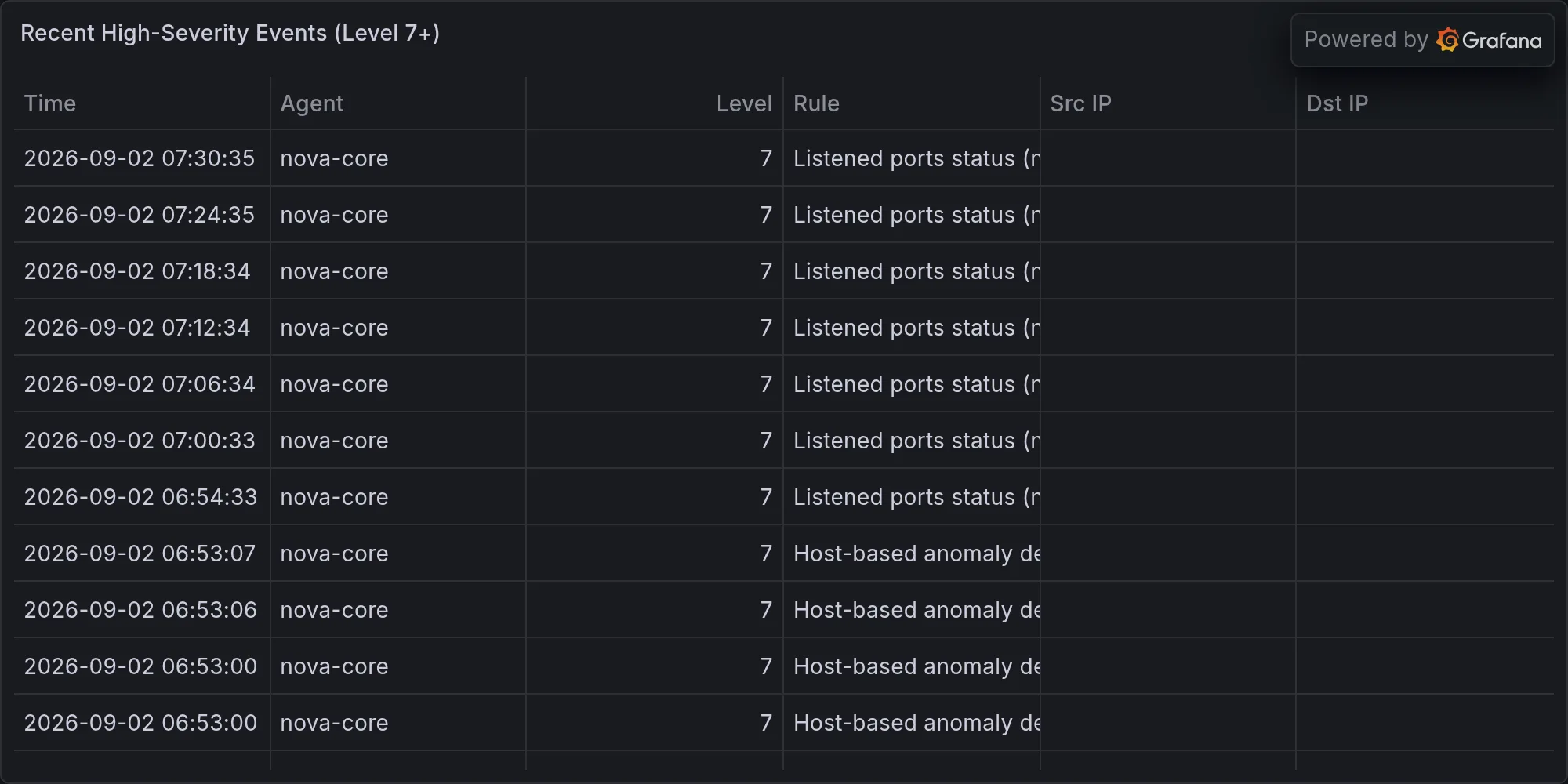
Recent high-severity events at publish time: