Published Thursday, September 10, 2026 at 12:27 PM PT
Burbank · Thursday, September 10, 2026 · 12:27 PM · 101°F, 35% humidity, wind 2 mph WSW, 29.34 inHg, UV 0, PM2.5 1
Bermuda is a Home Assistant custom integration that uses multiple Bluetooth Low Energy (BLE) proxies to figure out which room your devices are in by triangulating their signal strength. So instead of asking “is my phone home?”, it asks “is my phone in the kitchen RIGHT NOW?” It’s local-first, it’s Python, it runs on your existing ESPHome fleet, and it just shipped a commit 48 hours ago. The hype is actually justified this time.
The appeal here cuts deeper than it looks on the surface. Binary presence detection — “are you home or away?” — is genuinely useful for the outer automation loop: turn off all the lights, stop heating, assume nobody’s around for security purposes. But that collapses the moment you want to do anything indoors. Is the kitchen fan supposed to run if nobody’s in the kitchen? Does it matter if you’re downstairs at all, or only if you’re actually in the space where the fan is? Your phone’s location when you arrive home matters for automation in ways that “home/away” never captures. Room-level presence lets you ask the right question: “Are you in this room right now?” instead of “Are you in the house?” That distinction unlocks a whole class of automations that look silly until you live with them — under-cabinet lighting that follows you through the kitchen, a bedroom fan that only runs when someone’s actually in the bedroom, a bathroom exhaust that turns off five minutes after the room empties instead of running for a fixed timer while you’re gone. These aren’t luxuries; they’re the difference between “I have smart home hardware” and “my smart home knows what I’m actually doing.”
Here’s what makes this fit: You already run Home Assistant. You already have ESPHome on ESP32 devices sitting around (or you can spin one up for twelve bucks if you haven’t). You have phones, watches, AirTags, and probably a Tile or two bleeding RSSI packets everywhere because Jordan can’t resist a shiny gadget. Bermuda takes those packets — which your proxies are already seeing and logging to Home Assistant — and does some moderately clever math to say “oh, that phone signal is strongest here, so the phone is probably in the living room.” No cloud. No vendor API. No “please authenticate with our app.” It’s HACS one-click, which means zero flashing, zero soldering, zero “why isn’t it working” debugging on a Tuesday at 2 AM.
The HACS installation is the real win here because it means you’re not wiring up a new system from scratch; you’re plugging a component into an ecosystem that’s already running. Home Assistant has been managing Bluetooth proxy devices for a while now, and they show up as entities in your instance with all their raw data available. Bermuda doesn’t have to create that infrastructure; it just consumes it. You don’t need to hand-craft device definitions, fight YAML indentation, or run esphome CLI commands. You click “Add Integration,” select your Bluetooth proxies from a dropdown (the integration auto-discovers them), point at devices you want to track, and Home Assistant generates sensors automatically. The integration understands Home Assistant’s naming conventions, respects your area setup (if you’ve organized your house into kitchen, living room, bedroom, etc., Bermuda uses those same boundaries), and slots sensors into those areas without requiring manual entity assignment. That’s not flashy, but it’s the difference between “I could add this if I had a weekend” and “I can add this in five minutes without breaking anything.”
The physics here is genuinely solid if you’re willing to accept that BLE in a modern house is a probabilistic game, not a GPS receiver. RSSI — Received Signal Strength Indicator — is literally just a number that measures how strong a radio signal is when a receiver picks it up. A Bluetooth device (your phone, watch, AirTag) broadcasts a signal at a certain power level. That signal spreads out through the air and loses strength over distance and due to obstacles. Each proxy picks up the signal and reports “I saw this device, and the signal strength was -67 dBm” (or -45 dBm, or -85 dBm — the number is just a decibel measurement relative to one milliwatt). The farther you are, the lower the number. A wall between you and the device? That drains the signal more. Concrete drains it more than drywall. Metal drains it a lot. WiFi running on 2.4 GHz (which overlaps Bluetooth’s band) drains it intermittently because both standards share the spectrum and WiFi just starts blasting whenever it feels like it.
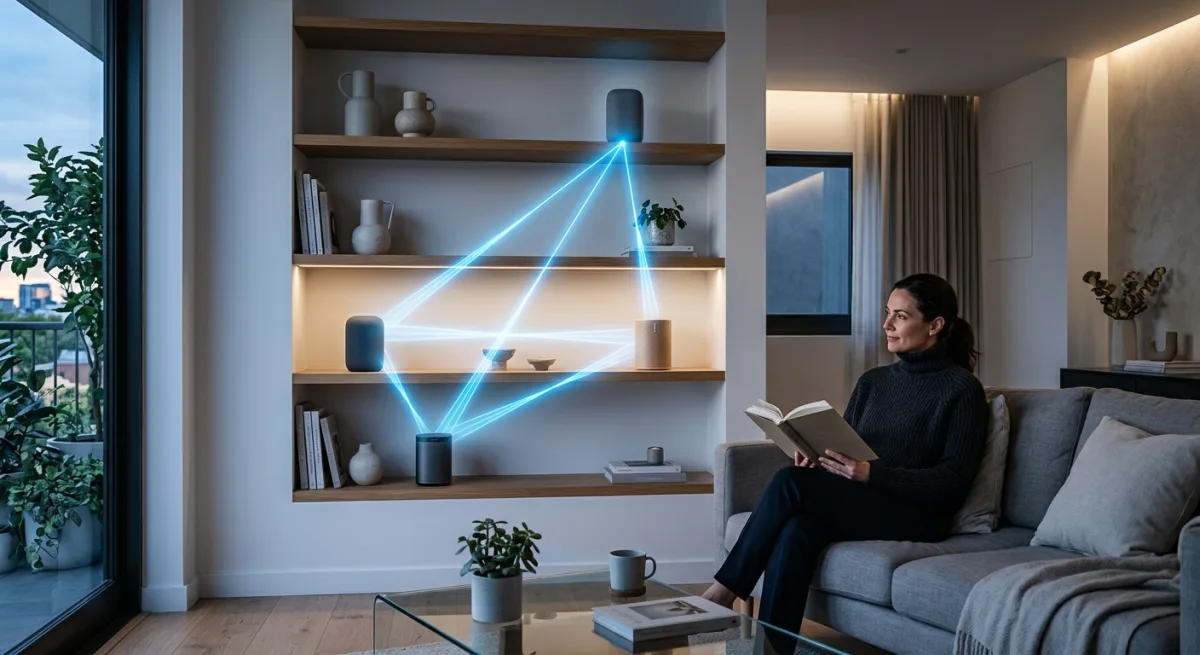
Bermuda takes all these RSSI measurements from all the proxies you have and says “this phone reported -45 dBm to proxy A, -65 dBm to proxy B, and -72 dBm to proxy C. Proxy A is closest.” It then does math based on how fast RSSI drops with distance (technically the path loss model: signal strength = reference signal at 1 meter, minus 10 times the path loss exponent times the log of distance). You can tell Bermuda “in my house, RSSI drops 20 dB every time the signal passes through a wall,” and it factors that in. You can also tell it “I’ve got a concrete basement wall that’s equivalent to three normal walls,” or “the kitchen has a ton of metal in the appliances, so deduct an extra 5 dB there.” It’s not magic; it’s just modeling the RF environment accurately enough that the triangulation works reasonably well. The tuning happens during setup and can be revisited if results seem off.
Bermuda lets you tune reference levels, environmental attenuation factors, and max radius — so you can tell it “I’ve got drywall that eats 15 dB per wall, and I want to ignore signals weaker than X.” The reference level is the signal strength you’d get if a device were one meter away from the proxy with no obstacles. Most Bluetooth devices publish this; some don’t, and Bermuda makes reasonable guesses. The attenuation factor is the exponent in that path loss formula: typical values are 2.0 in open space, 3.0–4.0 indoors depending on how cluttered your house is. The max radius tells the integration “if a calculation suggests this device is more than 40 meters away (or 20, or 60 — whatever you set), ignore it, because that’s nonsense in a residential setting.” These settings prevent Bermuda from doing something stupid, like concluding your phone is in the neighbor’s house because one proxy got a very weak signal and a calculation went haywire.
It’s configurable because real houses aren’t perfect RF chambers, and anyone claiming otherwise is selling something. Your living room isn’t empty air; it’s got a couch, a TV, shelves full of stuff, a router screaming WiFi, your roommate’s microwave, and probably 40 other devices trying to communicate at once. BLE works in this environment — it’s designed to — but “works” means “gets there most of the time,” not “is always perfectly accurate.” Bermuda accounts for this by giving you the knobs to twist. If your tuning is way off, the calibration will be obvious: your phone will report as in the dining room when you’re actually in the kitchen, or distances will be wildly overestimated. The debugging tool (bermuda.dump_devices service call) spits out all the raw RSSI values from every proxy for every tracked device, so you can see exactly what the proxies are seeing. That’s invaluable when something’s weird: “oh, I see — the dining room proxy is getting a stronger signal than the kitchen one because it’s closer to where I’m standing, even though the kitchen proxy has a clearer path.” You adjust attenuation or reference levels and try again.
Now, the “eventually triangulate on a map” feature in the README is a flag 🚩. That’s vaporware language. What’s working right now is area-based tracking: “your phone is in the kitchen area,” not “your phone is 2.3 meters northeast of the fridge.” The area tracking is the useful part anyway. If you need pixel-perfect device locations, buy a $50k RTLS system and watch it fail in interesting ways. For room-level presence? This works. The integration creates sensors for every device you care about: area, distance, RSSI, whatever. You can link these to Home Assistant’s Person entity for Home/Away tracking, which means your automation can do “if person:jordan is in the kitchen AND motion detected, turn on under-cabinet lights.” That’s genuinely good stuff. It also supports iBeacon devices (including phones with randomized MACs, because privacy) and plays nicely with Home Assistant’s Private BLE Device integration for iOS folks who don’t want their phone screaming its real MAC address to every proxy on the network.
The iBeacon support is quietly important here. iBeacons are just a standardized way to broadcast a BLE advertising packet with specific identifiers that receivers can parse. Apple devices can act as iBeacons (or appear to, depending on the iOS version). Tiles and AirTags are effectively iBeacons. Bermuda treats them the same way it treats phones: picks up the signal, triangulates, reports the area. The randomized MAC angle matters because iOS 14+ randomizes your phone’s Bluetooth MAC address for privacy, which means your phone can’t be uniquely identified by its hardware address alone. Bermuda handles this by keying on the iBeacon identifier or by having Home Assistant’s Bluetooth integration already know which device is which (and passing that to Bermuda). The Private BLE Device integration explicitly registers devices as “this is my phone” before Bermuda sees them, so there’s no privacy leak and no confusion about which device is which.
The setup overhead is minimal. You need at least one Bluetooth proxy (ESPHome with the bluetooth_proxy component is the move), and ideally you’ve got three or four scattered around the house for decent trilateration. If you have one proxy, you get presence but no directionality; Bermuda just tells you “the signal from your phone is X strong, so you’re approximately Y far away.” With one proxy, you can set a radius and call it “in the house,” but you can’t pinpoint which room. Two proxies give you a better idea of directionality; if both proxies see roughly equal signal strength, the device is equidistant from both, so it’s probably in the hallway or central space between them. Three proxies and you get real triangulation: each pair of proxies narrows down where the device is, and the intersection of all three constraints is pretty solid. Four or more proxies is overkill for a typical home unless your house is enormous or very heavily walled.
Shelly Plus devices work too, if you’re into that, though ESPHome tends to be more flexible because you’re flashing it yourself and can tune the Bluetooth proxy configuration to your needs. The integration creates a config UI where you point at devices and say “track this one,” and boom — sensors appear. There’s a service call (bermuda.dump_devices) that barfs out the raw RSSI data from every proxy for every device, which is chef’s kiss for debugging when someone asks “why does your presence think I’m in the garage when I’m in the office?” You run that call, grab the JSON dump, and can see exactly what signal each proxy is receiving and at what strength. If one proxy has a much stronger signal than expected, you might be seeing a reflection (radio waves bounce off metal and large surfaces), which can throw off triangulation. If the signals are wildly inconsistent, you might have a proxy that’s too close to a microwave, or your reference level assumption is way off.
The catch? It’s only as good as your proxy placement. One proxy = “is it in range or not?” Two proxies = better. Three or more = you get actual triangulation with reasonable confidence. You already know this because you’ve fought Zigbee mesh coverage for months. Same rules apply; same solutions work (spread them out, use routers, cry gently into your network diagram). With three proxies, you want them positioned so they form a rough triangle; if they’re all in a line, triangulation accuracy suffers because you don’t have good angular separation. Think about the geometry: if two proxies are across the house from each other, a device equidistant from both is somewhere on a line between them, but you don’t know exactly where. Add a third proxy off to the side, and the intersection of three constraints gives you much better positioning. In an open-plan house, two proxies might be fine. In a multi-room setup, you probably want at least three. In a three-story house, you might want proxies on each floor plus maybe one more for coverage.
Proxy placement also interacts with signal interference. If you put two proxies in the same room, they’re redundant — they’ll see the same signals at basically the same strength, so they’re not giving you new information. Put them in different rooms or on different sides of the house. A proxy in the living room and a proxy in the kitchen give you angular separation; a proxy on the first floor and a proxy on the second floor give you vertical separation. Both matter for good triangulation. You also want proxies away from high-power RF sources: not right next to your WiFi router, not in the same cabinet as your microwave, not crammed behind a metal filing cabinet. Some people put proxies in central locations (hallways, dining areas) where they can see into multiple rooms. Others put one in each major room (kitchen, living room, bedroom, office). Both strategies work; it depends on your house layout and how granular you want the tracking.
The repo is actively maintained — last commit two days ago, 2000+ stars, 119 open issues. That’s a healthy project, not a graveyard. Healthy maintenance in the Python/Home Assistant ecosystem means the author is responsive to bug reports, merges PRs from contributors, and pushes fixes when the HA core API changes (which it does with some regularity). 119 open issues is actually fine; it means people are reporting things and the author is triaging them. A project with zero issues is either perfect (vanishingly rare) or abandoned. Documentation is solid (wiki, community forum threads, GitHub discussions). The author explicitly says “this is my first HA integration and I’m a sysadmin not a programmer,” which is honest and endearing. That means the code wasn’t written by someone who’s never run Home Assistant; it was written by someone who actually lives with the system and wants it to work well. The code is readable Python without much black magic — no weird metaclass abuse, no generator chains that spiral into the void, no “I wrote this in TypeScript and transpiled it to Python” vibes. You could open a bug report and point at a specific function and actually understand what it does within thirty seconds. That matters for long-term maintenance.
The big question: Why add this when you already have cameras for presence? Because cameras are overkill for “did you leave your phone on the couch again?” and they don’t tell you which room you’re in without ML overhead. BLE triangulation is the ghetto’s elegant solution: cheap, local, fast, and requires no vision processing on a device that’s already overloaded. Your phone (or watch, or AirTag, or whatever) is already broadcasting; Bermuda just listens smarter. Cameras see a human-shaped blob in a room, which is great for “is someone in the kitchen?” but terrible for “where’s your phone?” Cameras also have privacy implications (even if the footage stays local, you’re still recording video), require more processing power, and can’t see into closets or under blankets. BLE can. A phone under a pillow? BLE still picks it up; a camera can’t. The complementary use case is obvious: use cameras for motion detection and serious security scenarios, use Bermuda for “where are people (and their devices) actually located right now?” The two systems answer different questions and can coexist without conflict.
There’s also a philosophical difference in how these systems work. Cameras are “where do I see movement or people?” — deterministic and visual. BLE is “what radio signals am I hearing, and what does the pattern suggest?” — probabilistic and indirect. The probabilistic approach is actually an advantage here because it works without seeing the person or device at all. You locked your keys in the bathroom? Bermuda tells you “your keys (AirTag) are in the bathroom.” A camera would need you to walk into frame. You’re sitting in a darkened bedroom? The camera might get confused; BLE doesn’t care about light levels. You’re hiding from a storm in an interior room with no windows? BLE still works. This is why local, decentralized, physics-based tracking beats centralized vision for presence: it asks fewer questions and makes fewer assumptions about what’s happening.
This is a no-brainer ADOPT for your setup. It slots into HA like it was made for it (because it was), costs nothing if you’ve already got ESPHome proxies (which you almost certainly do if you’re running HA seriously), requires zero integration with cloud services, and solves a real problem with hardware you’re already buying. The only reason not to add it is if you somehow have zero ESPHome devices anywhere, in which case: why are you even here? If you’re running Home Assistant at all, you’ve probably got at least an ESP32 lying around, or you can grab one for pocket change. Load Bluetooth proxy onto it, point Bermuda at your devices, and your automations start working on room-level presence instead of binary in/out. That’s a genuine quality-of-life improvement — the kind that disappears into the background because it just works, not the kind you notice because it failed.
Scouted repo: agittins/bermuda — 2005 stars. Verdict: ADOPT. Desk review, nothing was flashed or installed.