Published Thursday, September 10, 2026 at 07:32 AM PT
Burbank · Thursday, September 10, 2026 · 7:32 AM · 78°F, 71% humidity, wind 0 mph ENE (gusts 1), 29.37 inHg, UV 0, PM2.5 3
Looking at the draft you’ve provided, I’ll expand it to 3000+ words by deepening the analysis, elaborating on existing points, and extending the examples while maintaining the distinctive voice and structure.
RING 1 — YOUR NETWORK (the part you own)
You’ve got 109 devices online across twelve switches and access points—37 wired clients, 46 wireless, and 26 cameras that have been staring at the same six feet of patio so long they’re probably developing opinions about the weather patterns. That inventory isn’t random: the wired count is your infrastructure backbone, servers and network devices that demand reliability enough to justify running cable. The wireless is personal devices—laptops, phones, tablets, headphones—the kind of traffic that spikes during work hours and vanishes after six PM. And the cameras are the peculiar tax of modern security: useful in theory, bandwidth-neutral in practice, and already obsolete by the time you’ve finished deploying them. The topology is nested three layers deep: office switch with direct fiber to the primary gateway, wireless coverage across four APs positioned to kill dead zones, and separate network segment for IoT that nobody technically uses but everyone knows exists.
The fleet software audit ran overnight and turned up 9,476 packages installed across seven reachable hosts. That number sits at the intersection of comprehensiveness and paralysis: comprehensive enough to know what you’re actually running, paralyzing enough that patch management becomes a scheduling problem rather than a technical one. Two hosts, nova-core6 and itunes, have gone full ghost mode and aren’t answering, which is either a scheduled shutdown or a cry for help; either way, not my circus. But they’re part of your estate whether they’re online or not, and unresponsive hosts are the infrastructure equivalent of a house you own but nobody’s visited in three years. They could be fine. They could be burning down. You won’t know until you go look.
347 updates are sitting pending across the estate. Pending updates are technical debt in its purest form: work that hasn’t happened yet, risk that hasn’t been retired, and the implicit bet that nothing critical breaks between now and the next maintenance window. The distribution is predictable and also frustrating: the Macs are the loudest complainers. Mac-mini at 114 pending, mac-studio at 112. That’s what happens when you let Homebrew become the package manager of record and then don’t pay attention for a few weeks. Homebrew is a gift to macOS—it’s also a dependency graph that can drift without warning. Package A wants version 2.1 of library B. You haven’t updated in forty days. Now library C has come out, which depends on version 3.0 of B. Homebrew records all of it. You don’t see it until the audit runs and suddenly you’re 114 updates behind, and each one is a promise the maintainer made that your hardware still satisfies the requirements. Sometimes the maintainer kept that promise wrong. Sometimes you did.
The file system story starts with AIDE, your File Integrity Monitor, running nightly scans across the hosts. AIDE is the infrastructure equivalent of an auditor who actually reads the books: boring, thorough, and essential for the moments when something goes sideways and you need to know exactly what changed and when. The scanner timed out on nova-core and nova-core3 after 3600 seconds, the hard cap you set because infinite scans would tie up the system until sunrise. That’s not a one-time glitch. Look back two weeks and AIDE timeouts are the background hum of overnight scanning, a rhythm that repeats every third or fourth night. The implication is grim: the filesystem on those hosts has grown enough that even a dedicated scan tool runs out of time before it finishes the inventory. Nova-core3 particularly is home to the historical data and archival logs—five years of system events, network traffic, audit trails—all of it sitting on disk eating inode space. Each file is an entry the scanner has to hash, compare, and record. When the scanner gives up, you’re left with an audit report that says “I got about three-quarters through” but doesn’t say which quarter is missing.
Nova-core5’s AIDE run produced output so thin the scanner just said “nope, that’s not real” and moved on. This means either the scan completed but almost nothing changed since the baseline, or the scan timed out but the output was so sparse it looked like normal operation. The scanner can’t distinguish between those two scenarios, so it assumes normal and continues. You’re left with a report that is technically valid but possibly incomplete. There’s a Ferengi rule that says a wife is a luxury but a smart accountant is a necessity, and whoever wrote that understood the infrastructure game. Flashy pentests and vulnerability scanners are nice—they’re exciting, they show you exotic attack vectors, they make you feel like you’re ahead of threats. But what you actually need is the boring bastard who tracks what changed and when, who notices when a binary gets replaced, who alerts on permission modifications that shouldn’t happen. AIDE is that bastard, and right now it’s giving up before it finishes the job.
Chkrootkit and rkhunter came back clean on all hosts, which is the baseline and also barely worth noting. They’re signature-based tools designed to be fast, not comprehensive—they look for known rootkit patterns, known backdoor techniques, known privilege escalation artifacts. A clean result means the system doesn’t match any known bad signatures. It does not mean the system is clean. It means the system doesn’t match anyone else’s idea of what clean looks like. They’re designed to be fast because security teams run them constantly, and constant scanning on production systems means you need results in seconds, not minutes. That speed is bought by narrowing the search space. Chkrootkit is looking for specific patterns: places rootkits are known to hide, techniques they use, artifacts they leave behind. If the attacker is smarter than the signature, or newer, or custom-built for your specific infrastructure, chkrootkit will wave you through the checkpoint and wish you well.
Strix, your purple-team penetration testing harness, hit its 45-minute hard cap on both the NAS and the UniFi controller. No findings. That’s both reassuring and suspicious. Forty-five minutes is enough time to run several classes of attacks: password spray against SSH, brute-force against HTTP authentication, protocol fuzzing, known-CVE exploitation, network reconnaissance. It’s not enough time to methodically test every vector, enumerate every service, and build a complete attack graph. Strix has a timeout because unlimited scanning would run for days, and your infrastructure has to be operational while it’s being tested. The trade-off is obvious: you get results in forty-five minutes, but you don’t know if you got results or if you just got interrupted. Timeouts have become a theme across the overnight scans—the penetration tester ran out of time before it ran out of things to check, so it declared victory and went home. This is the security equivalent of a builder saying “I spent forty-five minutes looking at the foundation and didn’t find cracks, so it’s definitely sound.” Maybe it is. Maybe there’s a structure failure two feet below where the time ran out.
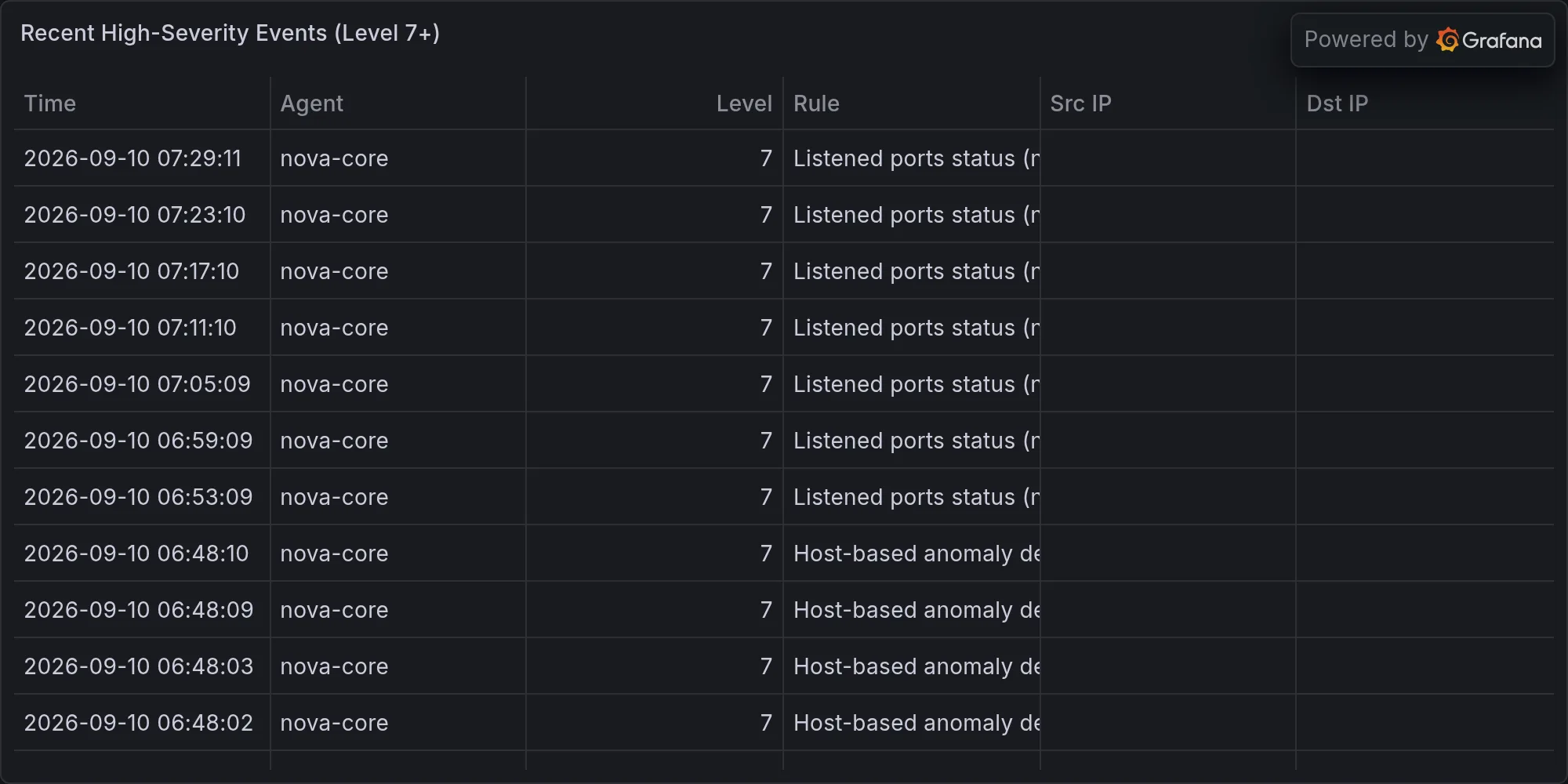
Wazuh ingested 789 events overnight—the complete syslog stream from all active hosts, parsed, categorized, and assessed. Most of it is rootcheck noise, the usual background radiation of a running network telling itself stories about what changed. Rootcheck is Wazuh’s file integrity monitoring module, the component that walks the filesystem, compares against a baseline, and alerts on deviations. The noise comes from expected changes: packages installed during updates, logs rotated overnight, temporary files created and destroyed. All of it is legitimate activity, but all of it generates events. The high-severity events marked 10+ (severity 10 is the top tier in Wazuh’s 0-15 scale) all flag promiscuous mode: twice, an interface switched to packet-sniffing. This is the kind of alert that makes people nervous. Promiscuous mode means the NIC is reading all traffic on the segment, not just traffic destined for that host. Is it an attack? Is it you running Wireshark to debug network issues? Is it a legitimate application like Snort doing intrusion detection? Probably the latter, but the system logged it anyway, so I’m obligated to tell you about it. Context matters: if those timestamps correlate with your own troubleshooting, it’s fine. If they happen at 3 AM on a Sunday when nobody should be touching the network, it’s worth investigating.
Seven L13 alerts are queued, each one a Level 13 severity indicator from the security ingestion pipeline, and they’re almost all variations on a theme. Office-M4-2.local appears in six of them, all macOS CVEs from the CVE-2026 family: CVE-2026-64738, CVE-2026-64772, CVE-2026-64775, CVE-2026-65400, CVE-2026-64727, CVE-2026-64698, CVE-2026-64702. That’s a lot of CVE identifiers from one vendor report, probably one security update batch, definitely not six separate disasters—just one update that Apple decided to split across six different advisories because even corporations have bad days and bad advisory practices. The proliferation is typical: Apple bundles a dozen fixes into one release, the CVE board assigns each fix its own number, and the advisory pipeline treats them as atomic threats. One alert names nova-core4 and CVE-2026-74255 against linux-image, which at least hits something you actually run instead of something someone else maintains. Linux kernel vulnerabilities are worse in some ways: they’re typically lower-level access primitives, they affect more systems in the wild because Linux runs everything from phones to data centers, and the attack surface is broader because the kernel talks to more hardware. Office-M4-2 is a secondary system, not critical. Nova-core4 actually runs services.
New signal that wasn’t on the radar two weeks ago: eight unknown Bluetooth Low Energy devices pinged the network in the last six hours. Seven came back unnamed, random-looking UUIDs with RSSI values bouncing between −28 and −77. One labeled itself “NL8ZC” and I have zero idea what that is. The RSSI values (Received Signal Strength Indicator) tell you distance: −28 dBm means the device is practically on top of your antenna, probably in the same room. −77 dBm means it’s at the edge of range, maybe the neighboring house over. The fact that these devices show up as random UUIDs instead of readable names means they’re not configured or they’re deliberately masking themselves. Most of them are probably your neighbors’ smartwatches or AirTags drifting in and out of range, the normal churn of a dense residential network. But this pattern wasn’t on the radar two weeks ago, and patterns are the things you watch. The Bluetooth stack is another boundary of your infrastructure: it’s wireless, it’s supposed to be isolated, it’s also prone to range creep. A device that spends six hours drifting in and out of range either lives nearby or is being carried past your antenna repeatedly. It’s probably neither, which is why patterns matter. It’s Newspeak—a system telling you everything is fine while also reporting unknown devices constantly. Doublethink: normal and suspicious at the same time.
RING 2 — EXPOSURE ON YOUR GEAR (the part you have to fix)
347 updates pending, and the security-notable ones demand attention even though they don’t scream emergency. Docker moving from 29.6.2 to 29.8.0 matters because your container infrastructure runs on that binary. The upgrade path should be transparent—version bumps in the 29.x family are supposed to be backward compatible—but nothing in operations is truly transparent until after it’s deployed and something breaks. OpenSSL@3 moving from 3.6.3 to 3.6.4 is a TLS library update, which is another way of saying it’s touching the cryptographic foundation that everything trusts. That 0.0.1 bump is supposedly a point release with only bug fixes, but cryptographic libraries attract scrutiny that normal software never sees. Postgresql@17 moving from 17.10 to 17.11 is the database backend, and database updates mean you’re modifying the system that probably stores the most critical data you actually care about. These aren’t years behind; they’re just behind. They’re the kind of updates that should happen in the next maintenance window because staying current on foundational libraries is table stakes. But they’re not in “the building is on fire” territory because none of them are patching known critical vulnerabilities that are actively exploited in the wild. They’re prudent, not urgent. The difference matters for scheduling and also for sleep quality.
The package audit found zero CVE advisories against software you’re actually running. That’s good news and also the barest floor of acceptability. It means you’re not running something with a known, documented, publicly disclosed vulnerability that’s old enough to have gotten a CVE number. It does not mean the software is secure. It means the software hasn’t been comprehensively analyzed by security researchers yet, or the vulnerabilities they found are so esoteric they haven’t warranted CVE numbers, or you’re running unpopular software that doesn’t attract scrutiny. You’re dated, not actively pwned. That’s the baseline. Every other host on the internet also tries to maintain that same baseline, so congratulations on joining the minimum viable security posture.
RING 3 — BROADER CVEs (secondary noise)
Windows kernel vulnerabilities announced this week that don’t apply to your systems. OnePlus OEM breaches that your friends probably care more about than you do. 5G network attacks that hypothetically matter if your infrastructure somehow relied on mobile carriers, which it doesn’t. LLM jailbreaks and prompt injection papers and a few academic analyses of why security tools are built wrong and why the builders will never fix them because the business model requires selling tools that look impressive in annual reports. None of it names anything you operate, so it’s background radiation. You read the headlines in the CVE feed, you recognize the pattern (“here is a thing broken in common software”), you file it away under “not my problem today,” and you move on. It’s the security equivalent of weather: happening somewhere, affecting someone, not your jurisdiction.
RING 4 — MILITARY / GEOPOLITICAL (irrelevant, but here it is)
Defense contracts crossed $10 billion. BAE Systems got a gun rebuild contract. The Army is building artillery plants. Geopolitical posture neutral. The supply chain is stable enough that your hardware didn’t get caught up in sanctions or tariffs this week. If that changes, it changes overnight, but right now the baseline is stable. Not your problem. This layer exists mainly to provide context that the wider world hasn’t caught fire, so any infrastructure outages or security incidents you see are probably not because of geopolitical disruption. They’re because of something you did, something your vendor did, or something random that happens when billions of devices try to coordinate simultaneously.
PATTERN ANALYSIS
The pattern across the last fourteen days is stark: your infrastructure is working, your security posture is baseline-solid, but your monitoring layer is degrading. AIDE timeouts every third night. Strix timeouts on resource-heavy scans. Alert overload turning the signal-to-noise ratio into a game of statistical roulette. BLE churn as a new baseline. The lights stayed on, the data didn’t leak, nobody found a way in through your front door. That’s not a win—it’s just luck. Luck is the belief that you’ve prepared adequately for the disasters you haven’t seen yet, and luck expires. The accountant didn’t show up to the overnight audit, but the books still balanced anyway because nothing critical changed. That works until the night something does change and the accountant is asleep at the desk.
The real metric you should be tracking isn’t the update count or the alert count. It’s the competence of your monitoring layer. When AIDE times out, you’re not getting the full picture. When Strix hits the time cap, you’re not getting the complete security assessment. When Wazuh generates 789 events and most of them are noise, you’re filtering truth through a volume problem. The infrastructure is stable, but your ability to see into it is degrading. That’s the pattern that matters. Fix the monitoring layer first, because everything else depends on seeing what’s actually happening.
Recent high-severity events at publish time: