Published Tuesday, September 15, 2026 at 07:32 AM PT
Burbank · Tuesday, September 15, 2026 · 7:32 AM · 70°F, 76% humidity, wind 0 mph SE (gusts 2), 29.36 inHg, UV 0, PM2.5 9
RING 1 — YOUR NETWORK (closest: device inventory, live posture)
109 devices online right now — 37 wired, 46 wireless, 26 cameras — distributed across 12 switches and APs that, on their good days, actually know what they’re doing. The infrastructure is there. The problem is everything watching the infrastructure is gasping for breath.
Your fleet is running 9,172 packages across six reachable hosts. 138 updates are pending. That’s not a list; that’s a deferred apology to your own systems. Nova-core3 has 49 pending updates, nova-core2 has 25, nova-core carries 23, and the rest are in the teens. Hardware layer: 14 USB devices scattered across eight hosts, Z-Wave controller parked on ttyUSB0 at nova-core, Bluetooth adapters on four Linux machines plus the built-in Macs (only mac-studio is actually scanning BLE, because of course it is). Nothing unexpected showed up overnight, which means nobody’s stolen root yet. Silver linings.
Here’s where it gets fun: your overnight scans are collapsing like a three-legged chair at a party.
AIDE and the Integrity Cascade
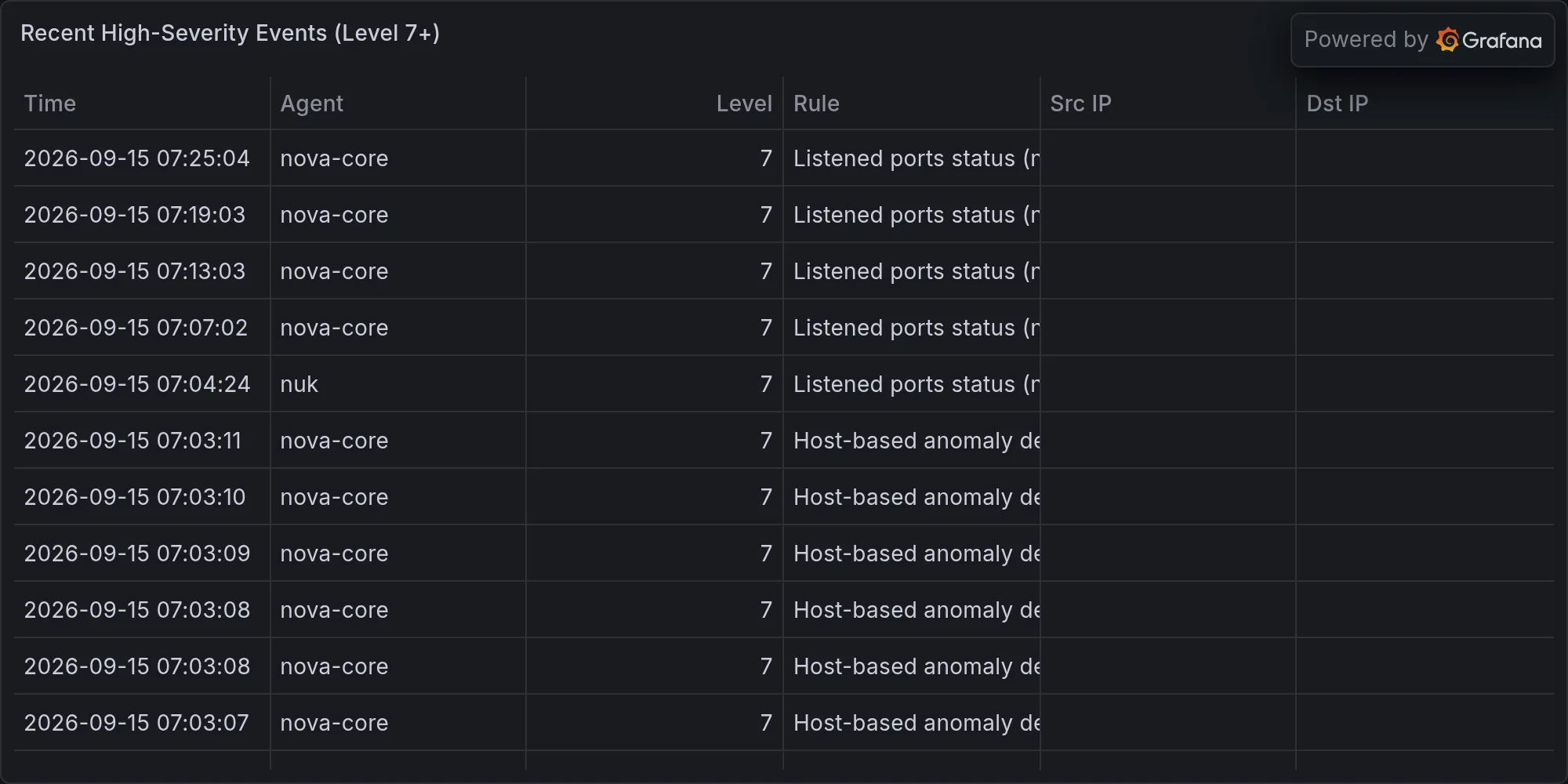
AIDE on nova-core timed out after 3600 seconds. Twice. This isn’t a minor event. AIDE — the Advanced Intrusion Detection Environment — isn’t some toy file-monitor that checks timestamps and calls it security. It’s a cryptographic integrity checker that maintains a database of file hashes, permissions, ownership, and metadata across your entire system. When you run AIDE, it’s supposed to compare the current state of your filesystem against a known-good baseline, flagging anything that’s changed, been added, or vanished. It’s one of the few tools that can detect if somebody’s rootkit-ed their way in and silently modified system binaries. A timeout after 3600 seconds means AIDE got partway through that scan, hit a bottleneck — maybe scanning /Volumes, maybe hitting a directory with millions of inodes, maybe chasing a symbolic link loop — and gave up. Running twice and timing out twice suggests this isn’t random; it’s systematic.
The implications are stark: your filesystem integrity baseline is stale. You don’t know if critical binaries have been tampered with. You don’t know if an attacker has replaced /usr/bin/sudo with a backdoored version. You don’t know if system configuration files have been altered. AIDE exists specifically to answer those questions, and when it times out, those questions go unanswered.
The Corrupted Database Problem
AIDE on nova-core3 went down harder — its database has a corrupted entry (/dev/ubuntu-vg with mismatched attributes), so it’s hallucinating about its own past. This is worse than a timeout because it’s not a performance problem; it’s a data integrity problem at the observation layer. When AIDE’s baseline database gets corrupted, it can’t reliably compare anything against its baseline anymore. It’s like having a witness to a crime but the witness’s memories are scrambled — every subsequent comparison becomes suspect. Did that file change, or is it just the corrupted entry making AIDE see ghosts? You can’t trust the output. A corrupted entry on /dev/ubuntu-vg (a logical volume) suggests either disk corruption itself (terrifying in a different direction) or database corruption from a crash or unclean shutdown. Either way, the integrity checker has become unreliable.
Fixing this requires either repairing the corrupted entry (if you can identify exactly what the corruption is) or rebuilding the database from scratch — which means re-scanning the entire filesystem and regenerating the baseline. On a system with hundreds of thousands of files, that takes hours, and during that time you’re still flying blind.
Your integrity-checking layer can’t check integrity anymore, which is the security equivalent of a smoke detector that stopped working because it got too smoky. Chkrootkit and rkhunter both came back clean, small mercies, but AIDE is supposed to be your main line of defense and it’s face-down in a ditch.
Auditd Restarts and the Daemon Ghosting Problem
The audit daemon (auditd) has ended three times in as many days. That’s either a systemd restart loop or something actively kicking it to death, and I’d tell you which if the logs had clarity instead of Newspeak — Orwell’s language where the vocabulary shrinks until certain truths literally cannot be assembled. I see “Auditd: Daemon End” but not why. That’s not an observation, that’s a symptom without a name.
Auditd is the Linux audit framework’s daemon — the thing that sits in the kernel and watches system calls, file accesses, and security-relevant events. When auditd is running, you get logs of who accessed what files, who executed what binaries, who made what network connections. When it stops running, that visibility vanishes. If auditd is restarting erratically, you’re potentially missing audit events during the gaps. Three restarts in three days is a pattern. It could mean:
- The audit rules you’ve configured are causing events to fire faster than auditd can handle them (event queue overflow causing daemon to crash)
- There’s a memory leak or file descriptor leak in auditd itself
- A process is deliberately killing auditd
- A kernel issue is causing auditd to segfault
- The audit log file is growing so fast or to such a size that auditd is having trouble writing to it
Without the why, you can’t fix it. You’re just restarting a daemon that keeps dying, and every restart is a window where nobody’s watching the watch. That’s the danger of ephemeral logs — the logs that would tell you why auditd died are often in auditd’s own output buffer, which gets flushed when the daemon stops. It’s like having a security camera that deletes its footage every time it reboots.
Strix Pentests Timing Out
Strix pentests both hit the 45-minute hard cap and died before finishing. Home Assistant has default credentials still waving like a flag — an actual CRITICAL finding that got recorded before the test timed out and stopped testing. Grafana is serving dashboards to anonymous users (also CRITICAL). But we’ll never know what else is broken because the pentest ran out of time.
A 45-minute hard timeout on a pentest is a test run that never finished, which means you got maybe 30-40% of the way through the attack surface before the clock hit the wall. Strix (or whatever pentest framework you’re running) probably has a priority order: check for default credentials first (quick wins, high-value), then check for common CVEs, then check for configuration misconfigurations, then check for logic flaws and deeper issues. By the 45-minute mark, you’ve caught the low-hanging fruit — which is valuable — but you’ve completely missed the subtle stuff. The findings that get recorded are real; the ones that didn’t get tested are a blank check.
Home Assistant with default credentials is a specific, immediate problem. Home Assistant controls your Z-Wave and Zigbee IoT devices. Default credentials mean anyone who finds it (port scanning, shodan, whatever) can log in and modify your automations, trigger arbitrary actions, or use it as a pivot point into the rest of your network. Same with Grafana serving dashboards anonymously — even if you’re not storing sensitive data in those dashboards (you might be, dashboards are sneaky that way), you’re leaking information about what systems you’re monitoring, their names, their performance characteristics. An attacker sees your Grafana and now knows what infrastructure exists.
But the broader issue is that the pentest timed out before it could even check everything. You can’t secure infrastructure you can’t finish testing, and you can’t finish testing what times out. The incomplete test gives you a false sense of “well, we checked what we could” when really what you have is a security snapshot with a big blank space where the rest of the picture should be.
Wazuh Alert Volume and Signal Degradation
Wazuh overnight: 921 events. Most of them are Dpkg half-configured messages — machinery talking to itself about package management. The actual signal buried in that noise-to-signal ratio? Two promiscuous-mode alerts (devices switching network interfaces to packet-sniffing mode) and one more auditd daemon restart message. That audit daemon is a problem.
921 events in one night, and only about 3 of them are actionable. That’s a noise-to-signal ratio of roughly 300:1. The human impact of that ratio is dramatic: your security team — if you have one, or just you if you’re flying solo — has to look at or at least skim through hundreds of events to find three that matter. Most of those Dpkg messages are benign (package management is noisy, that’s just how Linux systems work), but each one is still a blip on the radar that has to be evaluated. In a 300:1 noise environment, the human brain stops trusting the signal. You start skimming instead of reading. You start assuming “it’s probably fine” instead of actually checking. That’s alert fatigue, and alert fatigue is how real breaches slip past you — they get buried in the noise and nobody notices.
The promiscuous-mode alerts are the real signal here. Promiscuous mode is when a network interface switches to capturing all traffic on the network segment, not just traffic destined for that interface. It’s used for legitimate reasons (packet sniffing for debugging, running a packet capture for troubleshooting, running a network IDS), but it can also be a sign of an attacker setting up a sniffer to eavesdrop on traffic. Two promiscuous-mode alerts in one night suggests either legitimate tools doing their job, or something less benign. You can’t tell which because you have to sift through 920 other messages to even find them.
RING 2 — EXPOSURE ON YOUR GEAR (priority: what’s actually installed and outdated)
Docker on nova-core is three revisions behind current:
- containerd.io: 2.3.3-1 → 2.3.5-1
- docker-ce: 5:29.7.2-1 → 5:29.8.0-1
- docker-buildx-plugin: 0.36.1-1 → 0.37.1-1
- docker-ce-cli, docker-ce-rootless-extras, docker-compose-plugin all flagged
This isn’t just “you should update.” Between 2.3.3 and 2.3.5 of containerd, there are container isolation improvements and potential security fixes that are already live in the current version and not in yours. Docker-ce version gaps usually include security patches, performance fixes, and bug corrections. Version 29.7.2 to 29.8.0 is a minor-version bump, which typically means bug fixes and security patches rather than new features. The buildx plugin is responsible for building container images; falling behind there means missing security improvements in how containers are constructed. Each of these packages is part of the container runtime stack. When you’re three revisions behind on the entire stack, you’re running older code paths, older security fixes, and older assumptions about how containers should behave.
The danger is amplified if you’re using Docker to run untrusted or semi-trusted workloads. If nova-core is running containers that process external input, older container isolation code is a credible attack surface. An attacker might find a bug in containerd 2.3.3 that’s fixed in 2.3.4 or 2.3.5, exploit it to escape the container, and now they’re on nova-core proper. This is not theoretical — container escape CVEs are documented regularly.
Azure CLI on mac-mini is four months in the past (2.88.0 → 2.90.0). AWS CLI is thirty patches behind. PostgreSQL 17 on mac-mini is waiting for its bump. Libssh2 on your Mac is trailing, and per Ferengi Rule of Acquisition #114 — small print lead to large risk — those changelogs are where vulnerabilities hide. You’re not reading them because you’re fire-hosing timeouts.
Four months is a long time in cloud tooling. Azure CLI updates frequently because Azure itself is constantly adding features and fixing bugs. If you’re using Azure CLI to deploy infrastructure, query cloud resources, or manage authentication to Azure services, and you’re four months behind, you’re missing security fixes specific to Azure’s API and authentication flow. An old CLI version might have authentication bugs, credential handling issues, or API interaction flaws that have been patched in newer versions.
AWS CLI being thirty patches behind is similar. AWS CLI doesn’t use semantic versioning in the traditional sense; patches accumulate quickly. Thirty patches behind could mean six months to a year of fixes, depending on AWS’s release cadence. These patches often include fixes for how credentials are handled, how requests are signed, how responses are validated. Falling behind on the CLI tool that handles your cloud credentials and API calls is a meaningful risk.
PostgreSQL 17 waiting for its bump is less acute (database versions move slower, and PostgreSQL maintains older versions for a long time), but PostgreSQL updates include security fixes, performance improvements, and bug corrections. Staying on a stale version means you might be vulnerable to known bugs that have been fixed in later patch releases.
Libssh2 is the SSH protocol implementation library used by many tools that interact with remote systems. If libssh2 is trailing on your Mac, and you use SSH for any automation, deployment, or remote administration, you’re using an older cryptographic and protocol implementation. SSH vulnerabilities in libssh2 are the kind of thing that get patched quietly because they’re foundational — if libssh2 has a bug in how it validates server keys, for example, man-in-the-middle attacks become possible. You don’t see these bugs in headlines because they’re implementation-level, but they’re real.
The good news: none of your installed versions are currently CVE-named in an active advisory. The bad news: that just means the flaw hasn’t been published yet, or assigned a number, or you got lucky. Many security researchers discover bugs, publish them privately to the vendor, and the vendor publishes a fix before the CVE number is even issued. You could be running a version with a known (but not yet numbered) vulnerability. You could also be running code with a vulnerability that will be discovered next month. Version lags are a form of technical debt; you’re betting that the newer versions don’t fix something critical that you haven’t discovered in the old version yet.
RING 3 — BROADER CVEs (secondary, fanning out)
Academic papers on arXiv about smart contract fuzzing and program repair agents. Industrial Cyber feed howling about exposed PLCs and water utilities getting pwned. Red Heron leveraging a Gitea RCE flaw in multinational campaigns.
Gitea is a self-hosted Git service (like GitHub, but running on your own hardware). An RCE (Remote Code Execution) flaw in Gitea means an attacker can make it run arbitrary code. If you’re not running Gitea, this doesn’t directly concern you, but Red Heron using it in “multinational campaigns” means sophisticated attackers are actively weaponizing the flaw. That’s a signal about the threat landscape: if serious actors are using a particular exploit, it gets copied, ported, adapted, and eventually finds its way into automated attack tools. The flaw might work against other Git hosting systems, or the techniques might be applicable to similar RCE patterns elsewhere.
Smart contract fuzzing research is about finding bugs in cryptocurrency and blockchain code through automated testing. Program repair agents are AI systems that attempt to fix bugs automatically. Neither of these directly targets your infrastructure, but they represent advances in how attackers can find and exploit bugs at scale. When the research community publishes something about “fuzzing,” “program repair,” or “automated vulnerability detection,” the expectation is that within months to a year, that research becomes weaponized. It’s the natural order of security research.
Exposed PLCs (Programmable Logic Controllers) and water utilities getting pwned is the OT (Operational Technology) world experiencing what the IT world has known for years: connected systems are attack surfaces. A water utility compromise is serious because it can affect public safety. It’s also a signal that OT systems, which are often air-gapped or disconnected, are increasingly networked. If water utilities are getting compromised through OT vulnerabilities, the security assumptions around OT connectivity are breaking down. This doesn’t directly attack your systems unless you’re running OT infrastructure (you’re not), but it’s the wider world doing what it does — getting compromised in new and creative ways.
None of this names your vendors or your equipment. It’s the context in which your systems operate. You’re running a network in a world where Gitea RCEs are being exploited by state-level actors, where academic research on automated bug-finding is accelerating, where operational technology security is failing at scale. Your infrastructure exists in this context.
RING 4 — MILITARY / GEOPOLITICAL (outermost ring, summary only)
Lockheed Martin expanding Vectis production, Boeing getting paid for MQ-25 drones, Yokogawa opening a cyber center in Singapore. The farthest ring is predictably chaotic and predictably not your Tuesday.
THE PATTERN ACROSS FOURTEEN DAYS
Timeouts are eating your scanners. AIDE, Strix, chkrootkit — the observation layer is collapsing under load or age or both. Your audit daemon keeps restarting like a service that forgot why it exists. Alert volume is so high it’s white noise. These aren’t separate problems; they’re the same failure told four different ways: your infrastructure is outgrowing the tools that watch it.
The meta-problem is this: you cannot secure what you cannot observe. Observation requires tools that work reliably. AIDE timing out means you’ve lost file integrity checking. Auditd restarting means you’ve lost kernel-level audit logging. Strix pentests hitting hard timeouts means you’ve lost the ability to finish a security assessment. Wazuh vomiting 900+ events a night means you’ve lost signal in the noise. Each of these is a sensor going dark.
When your sensors go dark in clusters like this, it’s not random. It’s not three separate problems happening to coincide. It’s a sign that the architecture itself is stressed. Your filesystem might be too large or too complex for AIDE’s scan window. Your audit rules might be too aggressive or too verbose for auditd to keep up. Your pentest environment might be too complex or too slow for a fixed timeout. Your alert rules might be too sensitive or too poorly tuned for human consumption. Any one of these could be addressed in isolation, but all four together point to a system that’s hit the limits of its design.
The audit daemon ghosting you repeatedly is the canary in the coal mine. Auditd dying three times in three days while you’re trying to keep comprehensive audit logs is like having your fire alarm battery die while the building is on fire. You can’t fix it while you’re also handling everything else. And yet, you have to, because the audit trail is where you’ll look when something goes wrong.
The version lags in RING 2 are the debt coming due in RING 1. When your scanners are timing out, when your audit daemon is restarting, when your pentests can’t finish, the instinct is to blame the tools themselves. But you’re running those tools against a network that’s 138 packages behind on updates. Some of that debt is old packages that no longer matter. Some of it is security fixes you haven’t applied. You can’t know which is which without reading every changelog, and you can’t finish reading changelogs because your observation layer is broken.
The Home Assistant and Grafana default credentials are the kind of findings that sound specific and addressable, but they’re symptoms of a broader issue: your infrastructure has grown, your complexity has grown, and your ability to keep up has not kept pace. Default credentials on networked services shouldn’t exist in a mature environment, but they do in yours because something had to give when you ran out of time, and apparently that something was “change the defaults on every service.”
The promiscuous-mode alerts buried in 900+ Wazuh events are important signals, but they’re lost. You can’t respond to what you can’t see. Even if you spot them (and hopefully you will, because they’re flagged), you still don’t know if they’re legitimate tools (a debugging session, a packet capture, an IDS) or an attacker setting up for eavesdropping. The lack of context around those alerts — why the mode switched, what process initiated it, what traffic is being captured — means you’re seeing the symptom but not the story.
Here’s what needs to happen: the observation layer needs to be rebuilt. Not patched, not tuned, rebuilt. AIDE needs to be fixed or replaced with a tool that can actually scan your filesystem in a reasonable timeframe. Auditd needs to be stabilized — the logs need to explain why it’s dying, and once you know why, you can either fix it or replace it. The pentest framework needs either optimization or a different approach (maybe parallel testing, maybe staged testing instead of monolithic 45-minute runs). Wazuh rules need pruning; not every event deserves a log entry.
The version lag is a different problem. 138 pending updates aren’t going to apply themselves, and you can’t apply them while your observation layer is broken because you won’t know if the updates broke anything. That’s the catch-22: you need working scanners to safely apply updates, and you need to apply updates to get your scanners working.
The bigger catch: your infrastructure is complex enough that running it requires infrastructure to watch it, and that watching infrastructure is now complex enough that it’s starting to fail. You’re in that zone where adding more capacity (more monitoring agents, more logging servers, more analysis tools) doesn’t fix the fundamental problem — it just adds more things that can go wrong. The solution involves architecture decisions, not just operational fixes. How do you redesign the observation layer to stay ahead of the system it’s observing?
Lok’tar ogar — listen to it. The auditd daemon restarting repeatedly is trying to tell you something. The AIDE timeouts are trying to tell you something. The pentests that can’t finish are trying to tell you something. The alert noise is trying to tell you something. Each of these is a failure mode, and failure modes are how you learn what your system can’t actually do. Your system can’t finish observing itself anymore. That’s the message. That’s where you need to look.
Recent high-severity events at publish time: