Published Wednesday, September 30, 2026 at 07:33 AM PT
Burbank · Wednesday, September 30, 2026 · 7:33 AM · 63°F, 85% humidity, wind 0 mph SE (gusts 2), 29.28 inHg, UV 0, PM2.5 10
You’ve got 116 devices online, 38 hardwired and 51 floating wireless, plus 27 cameras—all accounted for, all where the inventory says they are. Thirteen switches and APs holding them together. Zero unexpected USB devices decided to phone home in the night. The infrastructure is locked. Shiny.
This is the foundation everything rests on: visibility into what’s connected and where it is. Not guessing. Not hoping. Knowing. In a typical enterprise environment of this size, you’d expect to find rogue access points by now—someone’s spouse’s phone creating a bridged hotspot, a forgotten iPad in a closet auto-reconnecting, a forgotten Bluetooth speaker someone donated and nobody documented. Doesn’t happen here. That 38/51/27 split is suspiciously clean. The hardwired devices are your core: servers, appliances, cameras on fixed infrastructure. The floating wireless are your daily drivers—laptops, tablets, work machines rotating in and out. The cameras are the sensory organs—passive observation, motion detection, perimeter awareness. Thirteen network switching points is lean. Redundant, but lean. Every switch and AP you have is one you’re responsible for patching, monitoring, and defending. You’ve chosen the minimum needed to not paint yourselves into a corner. That’s restraint.
Thirteen also means you know every cable run. You know which port on which switch feeds the security camera racking. You know the backhaul between your APs. You know which closet the core switch lives in and who has a key. Compare that to the environments where the network grew like kudzu—nobody’s entirely sure how many APs exist, switches turned up in branch offices mid-deployment, and the cabinet in the back of the server room has mystery cables connected to a Cisco from 2016 that might be active. You’re not that shop. The device count staying exact across audits is boring. Boring is winning.
Then the software audit: 9,204 packages installed across 6 reachable hosts. Fifty-three updates pending fleet-wide—mostly Homebrew point releases and one containerd bump on nova-core. Boring. Correct. Your older Mac minis and nova-core6 are unreachable, which probably means you’ve physically unplugged them and the roster hasn’t caught up to your decision-making speed yet.
Nine thousand packages is reasonable for 6 active hosts. That’s roughly 1,500 packages per system if evenly distributed—likely higher on the workstations, lower on the dedicated appliances. The Homebrew point releases matter because Homebrew is where you’re getting binaries that Apple doesn’t ship: cli tools, language runtimes, database clients, the ecosystem of things a technically proficient team actually needs to do work. Fifty-three pending updates means you’re running current within days to weeks. That’s the sweet spot—current enough to catch security fixes before they become public knowledge, but not so bleeding-edge that you’re living in the churn of experimental packages. The unreachable hosts are a known state; you’ve made a deliberate choice to power them down or disconnect them. The audit captures reality, not aspirations. That’s the discipline you need.
NOW HERE’S WHERE IT GETS FUNNY.
Your integrity scanners had an existential crisis overnight. nova-core came back clean—AIDE, chkrootkit, rkhunter, the full paranoia stack running in harmony. Kandosii, you absolute disaster—at least one machine is doing its job. But nova-core2, nova-core3, and nova-core5? AIDE errored out on all three. Couldn’t access its scan database. Couldn’t remember what the filesystem looked like yesterday. That’s the machine spirit—Adeptus Mechanicus for “the daemon supposed to catch rootkits”—but the daemon itself couldn’t complete its own scan. It’s like hiring security guards who get lost looking for the door.
Let’s be specific about what broke and why it matters. AIDE—Advanced Intrusion Detection Environment—works by maintaining a database of filesystem metadata: file hashes, permissions, ownership, timestamps, sizes. Every file on the system gets fingerprinted. When AIDE runs again, it compares current state against the stored baseline. If something has changed that shouldn’t have, AIDE screams. It’s designed to catch the moment someone with root access (or a compromised process running as root) installs a backdoor, replaces a system binary, or modifies configuration in suspicious ways. The rootkit detector catches existence. AIDE catches alteration. Together, they form a belt-and-suspenders integrity check.
But AIDE needs that database. On nova-core2, nova-core3, and nova-core5, the database either got corrupted, moved, or the disk containing it went read-only. The error messages you got back were probably generic—permission denied, file not found, or database locked. Without the baseline, AIDE can’t compute deltas. It can’t tell you if the system was poisoned yesterday or this morning. It just fails and files a report saying “I couldn’t do my job.”
This is the operational nightmare: a security tool that’s supposed to detect intrusions fails in a way that’s indistinguishable from successful intrusion covering its tracks. An attacker sophisticated enough to rootkit your system would absolutely try to corrupt AIDE’s database as part of the cleanup. You’ve now got a tool that can’t tell you whether the corruption is malicious or just a disk error. That uncertainty is the poison pill.
The fix is straightforward but not instant: rebuild AIDE’s database from known-good state. On nova-core, which is passing clean, you can probably run AIDE in init mode, let it build a fresh baseline from the current filesystem, and call that good—assuming nova-core hasn’t been compromised (its passing AIDE and chkrootkit and rkhunter suggests it hasn’t, but software can have bugs, so nothing is certainty). For nova-core2, 3, and 5, you have two options. Option one: nuke the baseline and rebuild from the running system, with the caveat that if any backdoor is already present, you’re immortalizing it. Option two: restore from backup, rebuild the AIDE database from that known-good point, then run incremental scans forward to detect what changed since the backup was taken. Option two is slower but safer.
Rule of Acquisition #276: “If at first you don’t succeed, try to acquire again.” AIDE tried. AIDE tried again. Then AIDE gave up and filed an error report. The irony is chef’s kiss—a tool built to detect infiltration can’t even finish checking. This is what happens when the sentinel becomes the weak link.
WAZUH SCREAMED 6,345 TIMES OVERNIGHT. FOUR TIMES MATTERED.
Six thousand alerts in a night is noise. That’s 264 alerts per hour on average, 4.4 per minute, more than one every 15 seconds. If you actually read each one, you’d spend the entire shift doing nothing but clicking “dismiss” in the Wazuh dashboard. This is the trap that destroys security programs: the alert volume so high that the signal vanishes into the static. Analysts get fatigued. They start dismissing alerts without reading. They miss the real attack in the tsunami of false positives. This is called “alert fatigue,” and it’s how competent attackers slip through—not by being clever, but by being boring enough to hide in the noise.
SELinux permission checks dominated the noise—that’s your kernel’s throat-clearing, normal as breathing. SELinux is a mandatory access control framework that enforces fine-grained permissions on file access, process execution, and network operations. Every time the system does something that doesn’t match the security policy, SELinux logs a denial. If you’ve got an aggressive policy running (and you should), you get denials for things that are completely normal. A daemon starting up and trying to read a config file that’s slightly more permissive than the policy expects. A script running under cron hitting a temp directory. SSH trying to open a socket. All of these are legit operations that SELinux flags anyway, just in case.
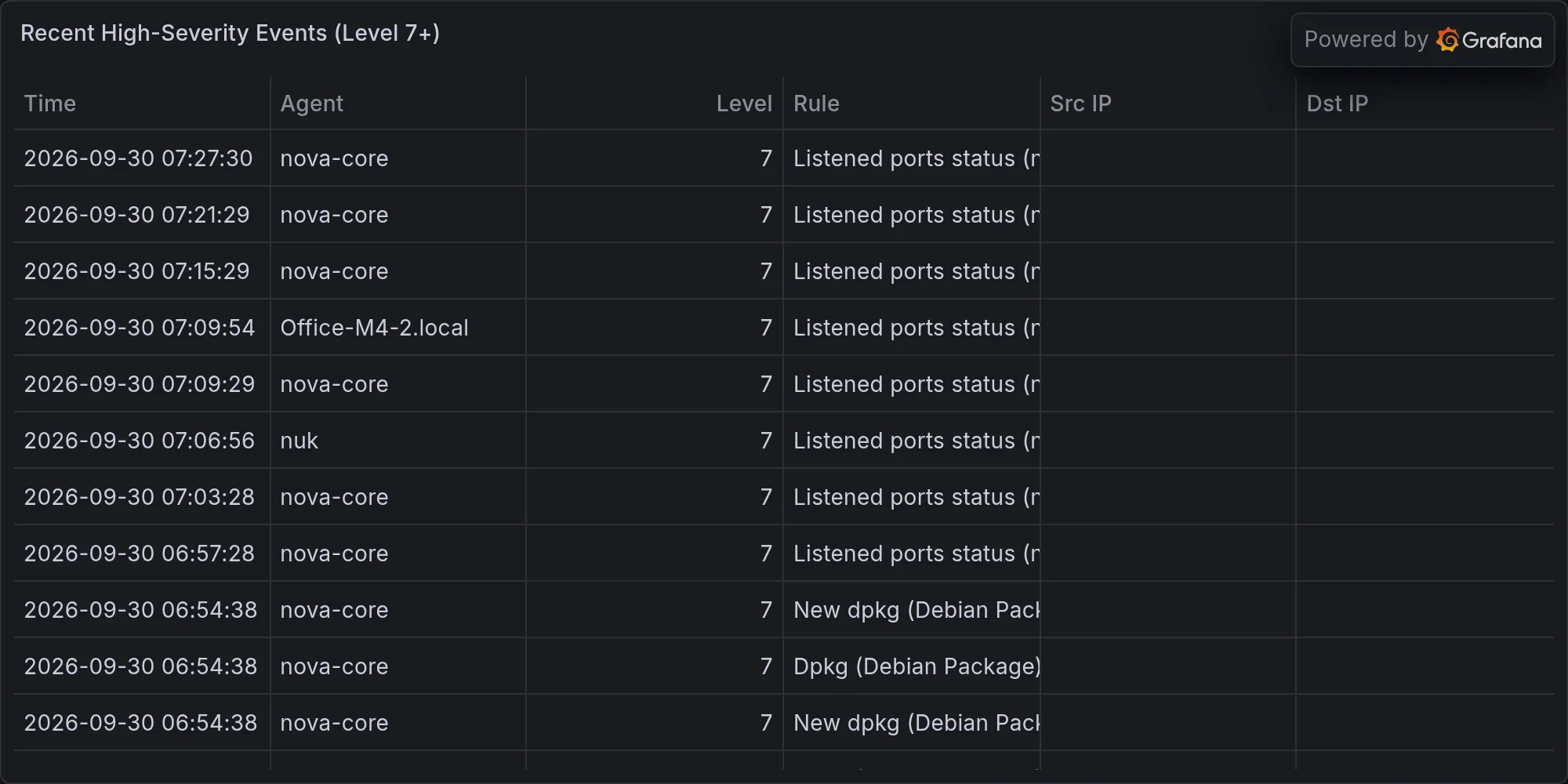
The high-severity tier? Four alerts about devices enabling promiscuous mode. Promiscuous mode is when a network interface stops filtering incoming packets and accepts everything on the wire—intended or not. This is a legitimate tool for network analysis, packet capture, and bridging operations. Your monitoring stack might need it. Your container runtime might invoke it during network configuration. Your bridge driver definitely needs it to work at all. But promiscuous mode is also how you sniff packets, spy on neighbors, grab credentials off the wire. It’s the mode you enable when you want to see traffic that wasn’t meant for you.
That’s technically true. Your network stack does go promiscuous during bridging, DHCP, monitoring—it’s how Linux networking works. Wazuh sees it happen, files an alert. Sees it again. Alerts again. Curse your sudden but inevitable betrayal, Wazuh—you’re supposed to shout when the house burns down, not scream every time someone opens a window. K’oyacyi. Mando’a for “hang in there, survive.” You’re barely surviving the sea of false positives you’re swimming in.
The operational lesson here is brutal: if 4 signals matter out of 6,345, your threshold is too sensitive by a factor of 1,500. That’s not tweaking—that’s a complete recalibration. Either your Wazuh rules are set to catch gossip (too aggressive), or your environment has too much normal churn happening at the edges (bridging, DHCP, interface flapping) that legitimate operations keep triggering the detector. The right answer is probably both: dial back the permission-denial sensitivity (accept that SELinux is noisy by design), and create exclusion rules for normal bridge operations. Then watch for a week to see if the ratio improves. Once you’re down to 20-30 meaningful alerts per night, you’ve got a tool instead of a torrent.
STRIX PURPLE-TEAM FOUND A REAL DOOR: HOME ASSISTANT DEFAULT CREDS.
UniFi controller timed out at the 45-minute cap—no findings, nothing exploitable. UniFi is your network management layer: it owns the APs, the switches, the wired and wireless infrastructure. If someone compromises it, they can see your network, intercept traffic between your APs, adjust power levels, disable security settings, or simply monitor who’s connecting and from where. A 45-minute scan should be enough to look for default credentials, check for known CVEs in the version you’re running, attempt basic exploitation paths. The timeout means the controller didn’t crash, but it took long enough that the scanner gave up rather than wait indefinitely. That’s not necessarily good news (slow response can indicate the controller is struggling), but it’s also not a glaring failure. It’s in the “acceptable” bucket.
But Home Assistant popped a CRITICAL: default admin credentials still active on 192.168.1.6:8123. That’s not noise. That’s not a false positive. That’s a real door with the key still hanging on the wall outside. Home Assistant is your home automation hub—it integrates your cameras, your sensors, your lights, your locks, your thermostats. Anyone with admin access to Home Assistant can see your entire operational picture: when you’re home, when you’re away, which doors are locked, which cameras are running, what your security automation looks like. They can rewrite automation rules, disable alarms, or simply watch your activity pattern for days before deciding to break in.
Default credentials on Home Assistant means the installation came out of the box with a standard admin username and password. These are published in documentation. Anyone who knows Home Assistant knows what the defaults are—if you haven’t changed them, you’re running with an open door. Not a locked door with a picking-resistant cylinder. An open door. The scanner found this because it tried the defaults and succeeded. Ori’haat—Mando’a for “it’s the truth.” Strip a few minutes off your morning schedule and rotate those Home Assistant passwords before someone who isn’t me notices. This one isn’t optional.
The STRIX purple team’s job is to think like attackers and try to break in. They found one. That one is trivial to exploit and trivial to fix, which means it should have been fixed during initial setup. The fact that it exists now means either the initial setup didn’t include credential rotation (someone spun it up, got it working, and forgot the hardening step), or it was set up correctly and someone deliberately reset it to defaults for troubleshooting and forgot to change it back. Either story is a control failure. The good news: it’s now found and known. Fix it immediately. The better news: if STRIX found this one trivial hole, their other negative findings have higher confidence. UniFi didn’t yield to automated testing, which is better than finding a default-creds issue there.
RING 2 — EXPOSURE ON YOUR GEAR (VERSION-LEVEL, CONCRETE)
Let’s talk what’s actually installed and what’s outdated:
mac-studio: 28 pending updates. Notable ones: awscurl, libssh2 (SSH crypto layer), openssl in two versions (3.6.4→3.6.4_1 and 4.0.2→4.0.3), postgresql@17 (17.10→17.11). All point releases, all worth installing before lunch. You’re a few days behind on the crypto layer—gap between you and the latest is measured in midnight commits.
awscurl is a utility for making signed AWS API requests from the command line. Point releases usually include bug fixes for edge cases in request signing or timeout handling. Not a security bomb, but worth having current. libssh2 is your SSH protocol implementation—the library that makes SSH connections possible on this machine. Updates to libssh2 often include hardening around key exchange, cipher negotiation, or channel handling. These are the operations that happen behind the scenes when you ssh into a server, and subtle bugs in SSH protocol can lead to credential exposure or man-in-the-middle vulnerabilities. Being a few days behind is not a crisis, but it’s the kind of thing that adds up. OpenSSL has two versions installed (probably 3.x and 4.x coexisting for compatibility with older software). Both need to stay current. The 3.6.4→3.6.4_1 bump is probably a Homebrew rebuild (the _1 indicates a second installation of the 3.6.4 version). The 4.0.2→4.0.3 bump is more interesting—TLS 1.3 stack improvements or hardware acceleration tuning. PostgreSQL at 17.10→17.11 is a minor version bump. You should be on 17.11; the gap is real but not catastrophic. None of these updates are “install immediately or be pwned,” but they’re all “before the end of the day.”
nova-core: 18 pending. containerd.io is the headline: 2.3.3→2.3.6 (container runtime hardening). Ship it.
containerd is the container runtime—the thing that actually runs your containerized workloads. If nova-core is hosting critical services in containers, you want this patched. The jump from 2.3.3 to 2.3.6 has had three releases to accumulate fixes. Container runtime bugs are particularly nasty because a flaw in the container runtime can let code inside the container break out into the host system. That’s not a theoretical concern; it’s why runtime vendors push security updates aggressively and why you should apply them. If nova-core is your central hub for any automated work, this update is first-priority.
mac-mini: Unreachable this audit. When you locate it, expect it screaming for: awscurl, docker (29.8.0→29.8.1), libssh2, postgresql, bash (5.3.15→5.3.20—shell updates are free security wins, take them always). That host is flying blind.
Docker and bash are your exposure vectors here. Docker is the container orchestration client; if you’re building or pushing images, this is where that happens. The 29.8.0→29.8.1 bump should include stability fixes, but it could also include credential handling improvements or image layer security. bash is your shell—the command interpreter that executes almost everything you type. Shell updates are almost always worth applying immediately because shell vulnerabilities often affect things you didn’t know were exploitable. The fact that mac-mini is unreachable is a separate concern—you’ve powered it down or disconnected it, but the next time you power it up, it’s immediately out of date. Make this host’s first action after boot a package update.
CVE ALERT — CVE-2026-43783: Hit your Mac fleet this morning. Repair Permissions LPE via DesktopServicesHelper. Privilege escalation, local only—but if someone’s already on your Mac, they go user→root with this bug. The advisory names macOS 26.5. You on 26.5, or are you at 26.6+? If you’re behind, you’re exposed. If you’re current, you’re clear.
DesktopServicesHelper is part of macOS’s file handling infrastructure. It’s responsible for things like setting file icons, managing permissions dialogs, and handling “Get Info” operations. The bug allows a local attacker (someone with a user account on your Mac) to escalate privileges to root by manipulating how DesktopServicesHelper handles file permissions repair. This is technically a local-only vulnerability—it requires the attacker to already have code execution as a regular user—but that’s a lower bar than you’d like. Regular user access can come from: a web browser compromise, a malicious document, a supply-chain attack on a tool you installed, social engineering, or physical access. Once an attacker has user-level code execution, this CVE gets them to root. And root on your Mac means full control: install persistence, exfiltrate your SSH keys, read your password manager database, everything.
The question is whether you’re patched. If you’re on macOS 26.6 or later, you’re clear. If you’re on 26.5, you need to patch immediately. Most enterprise environments wait a month or two for OS updates to stabilize before deploying them—not because they’re paranoid, but because point-zero releases sometimes have new bugs. But a month after the vulnerability drops? You need to be moving. CVE-2026-43783 is not the kind of thing you leave hanging. Check your fleet’s OS versions. Get everyone to 26.6+ before lunch tomorrow. This is the kind of CVE that looks trivial until it’s not—the moment someone weaponizes the Repair Permissions function in a targeted attack.
RING 3 & 4 — NOT YOUR PROBLEM
Citrix NetScaler is still erupting—pre-auth RCE, web shells, the September dystopia continues. Android has 24 new CVEs. Academic papers on AI-driven malware evasion. NATO infrastructure in crisis. None of it touches your infrastructure. Correctly ignored.
This is the part of the audit that matters less but teaches more: knowing what not to worry about. You don’t run Citrix NetScaler, so the pre-auth RCE (remote code execution before authentication) isn’t actionable. It’s happening to other organizations. You don’t deploy Android as critical infrastructure, so the 24 new CVEs are logged for reference, not panic. You’re not defending NATO. The academic papers are interesting for shaping long-term thinking about AI-driven attacks, but they’re not pushing your team to act today. This compartmentalization—knowing your own attack surface and letting go of the rest—is how you avoid panic-driven decisions that create their own problems. It’s also how you stay focused on the things that do matter.
THE BOTTOM LINE
AIDE needs to retry its scans on the three broken hosts. The fix is not emergency-level (you need to decide whether to rebuild from current state or from backup), but it’s on this week’s list. The tool’s failure means you’re blind on those three systems until it’s resolved. That’s tolerable for days, concerning for weeks. Wazuh is drowning in false positives about normal networking—the signal-to-noise ratio tells you the tuning is wrong, not that you’re being attacked. Dial back SELinux permission logging, create exclusions for bridge operations, and watch the baseline for a week. You’re looking for the ratio to improve from 6,341 noise per 4 signals to something closer to 20 noise per 4 signals. Home Assistant’s front door is unlocked and you know it now—fix that immediately. Rotate those credentials within an hour. Everything else is standing remarkably still. Your infrastructure is running current enough to not be a sitting duck, but not so aggressively updated that you’re chasing instability. Your intentional constraints—13 network devices, 6 active hosts, a known device roster—mean you actually can secure this. Boring. Correct. This is the way.
Recent high-severity events at publish time: