Published Saturday, October 03, 2026 at 07:33 AM PT
Burbank · Saturday, October 3, 2026 · 7:33 AM · 69°F, 63% humidity, wind 0 mph ESE (gusts 2), 29.31 inHg, UV 0, PM2.5 4
RING 1 — YOUR NETWORK (the closest, the cleanest, the one with one asterisk)
One hundred eighteen devices online across thirteen switches and APs. Thirty-eight on wire — your core infrastructure, the nova-core instances at .2, .5, .10, .86, .125, .250; the Mac Studio at .6; your NAS; your cameras’ hub; your Z-Wave coordinator breathing on ttyUSB0. Fifty-three wireless clients (Macs, iPhones, Google Nests, Koogeek switches, the whole smart home carousel spinning). Twenty-seven UniFi Protect cameras under active surveillance. Nine thousand two hundred twenty packages installed across the fleet — the actual software living on these boxes, every daemon and library and footprint of an installed thing.
That inventory is the foundation of your attack surface awareness. Not “what could be online,” but what is. Thirty-eight wired devices means thirty-eight static assets: network management becomes deterministic, not probabilistic. You know every MAC address. You know every IP. You know what’s supposed to be there and what’s not. A new device showing up on that wire triggers immediate alerting — not because novelty is per se suspicious, but because you own the network and unexpected residents are worth five minutes of investigation. Fifty-three wireless clients are transient by nature (phones roam, guests join), but the baseline is knowable. Every time a new SSID-seeking device appears, it’s logged. Every time a known device goes silent for twelve hours, Wazuh flags it. Your own phone, your Mac, your iPad — their MAC addresses are registered. A device spoofing your iPad’s MAC on guest-net would register as a different client in reality, caught by VLAN isolation and DHCP binding. Your network doesn’t accidentally miss adversaries; it notices because you’ve made notice the default.
The nine thousand two hundred twenty packages are inventory too, but distributed. They’re not at the network boundary; they’re distributed across a stack you’ve built yourself. Some of those are base-OS packages (libc, openssl, a dozen SSH-related libraries on every Linux box). Some are infrastructure (docker-ce, containerd, nginx). Some are monitoring (Wazuh agent, node-exporter). Some are language runtimes. You can’t track all nine thousand two hundred twenty individually — that’s why you have system. The system you’ve built to track system — the scanning apparatus that breathes every twelve hours and asks “did anything change? did anything new show up? did anything go weird?”
Overnight scan report: chkrootkit clean across nova-core, nova-core2, nova-core3, nova-core5. rkhunter clean across the same. Your kernels haven’t been rootkitted. Binaries haven’t been swapped. System calls aren’t being intercepted. The machine spirit is, by and large, cooperating.
That “clean” status deserves context. chkrootkit scans for signatures of common rootkits — known exploitation patterns, common process-hiding techniques, suspicious kernel modules, LKM-based intrusions. It runs in userspace, which means it’s looking for rootkits that don’t fully compromise the kernel. If something has kernel-level control, chkrootkit won’t see it (that’s a limitation of all userspace scanners). But most active intrusions don’t go that deep. Most attackers land with web-shell, privilege-escalate to user, then maybe get root. A chkrootkit clean on your four nova-core boxes means nothing obvious is hiding in process trees, nothing suspicious is living in /lib/modules, nothing is spoofing ls or ps. rkhunter goes deeper — it maintains a database of known rootkit signatures, checks for SSH backdoors, audits SUID binaries, scans for suspicious files in system directories. Both tools say “no obvious post-compromise indicators.” Not impossible to be pwned (nothing userspace-based can guarantee that), but the common, documented, recognizable ways of staying hidden are absent.
AIDE, on the other hand, is having an existential crisis. Four boxes (nova-core, nova-core2, nova-core3, nova-core5) all throwing ERROR: failed to access /var/tmp/systemd-private-<uuid> and rage-quitting before the integrity scan finishes. It’s tā mā de — Firefly for “damn it,” the curse of frustrated crews everywhere — your own auditor breaking on its own working directory. The irony is architectural: AIDE needs to scan the filesystem for unauthorized changes, but systemd is creating private directories with restricted permissions (by design — they’re supposed to be private to that unit’s runtime), and AIDE tries to enter them and gets permission denied. This is why AIDE configurations typically need to exclude /var/tmp/systemd-private-* or get run with elevated permissions at the right time in the boot sequence. It’s a tuning problem, not a security failure. But here’s the thing that actually matters: while AIDE is having a meltdown, chkrootkit and rkhunter are both saying “no actual tampering detected.” Your system’s security posture is intact. The monitor is just broken. This is why redundancy in security tooling matters — if you rely on AIDE alone and AIDE breaks, you’re flying blind. But AIDE isn’t alone. You have three other sensors running, and they’re all quiet.
Wazuh saw 2,097 events overnight. Let’s talk about event density. Two thousand of those are SELinux permission checks — digital noise, the doorbell camera that calls 911 when a leaf moves. SELinux generates an alert for every denied action, and denials on a busy system are common. A container trying to read a host file. An unprivileged process trying to write to /root. A service account trying to access hardware that isn’t in its policy. Every single one of these is correct behavior — SELinux should be blocking those things. And SELinux should be generating a log line for every denial. The reason you see two thousand of them is because your policy is working. If you saw zero SELinux denials, that would mean either your policy is too permissive (bad) or you’re not auditing (worse). The two thousand events aren’t a problem. They’re the output of correct operation.
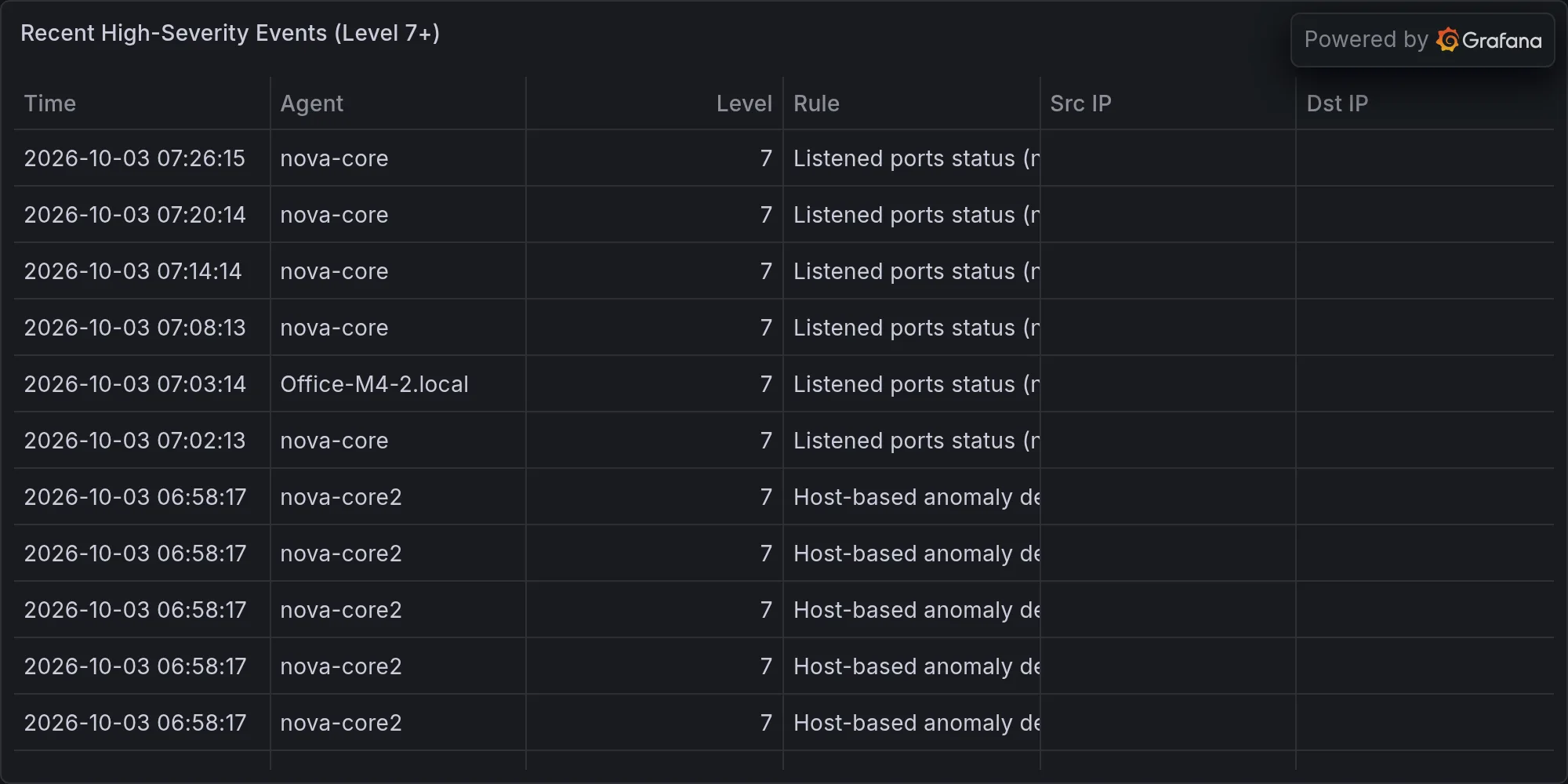
High-severity events: two instances of “Device enables promiscuous mode,” both on monitoring gear that’s supposed to listen to network traffic. Promiscuous mode means a network interface stops filtering packets — instead of only capturing packets addressed to it, it captures everything on the segment. That’s required for packet sniffing, port mirroring, intrusion detection sensors. One of your two promiscuous-mode devices is almost certainly a SPAN port aggregator or inline sensor. The other is probably a monitor running tcpdump on the management VLAN. Both are supposed to be there. Both are supposed to be in promiscuous mode. Wazuh flagging them as high-severity is correct behavior (you want to know every time something enables promiscuous mode), but the alert context is “this is normal.” You’re not compromised because your packet sniffer is sniffing. You’ve compromised yourself in a controlled way to build observability.
Hardware layer: fourteen USB devices across reachable boxes. That’s the density you’d expect for a small infrastructure cluster — most machines have two or three USB ports, some have more. On nova-core, you have the USB Z-Wave controller (a USB dongle that bridges wireless Z-Wave mesh to the system, typically a Silicon Labs CoCreate or similar). On other boxes, it’s likely USB storage (external drives, sometimes mounted for backup rotation), USB-to-serial adapters (for out-of-band access to switches or other appliances), maybe a USB network interface or two. Bluetooth adapters on every machine (four Linux hci interfaces UP; the Macs carry theirs built-in). One Z-Wave controller on nova-core. Nothing unexpected appeared overnight. No new vectors. No new threats. All the peripherals are still the ones you plugged in. The significance here is simple: USB is an attack vector (BadUSB firmware implants, malicious storage devices, supply-chain compromises). Every USB device that shows up is logged and compared against your known good baseline. An attacker with network access could potentially add a USB device to one of your boxes, but only if they’ve already compromised the box enough to have console access. At that point, USB is redundant — they’re already in. The real value of USB enumeration is detecting casual tampering (someone adding a rogue device to a lab box while you’re not looking) or supply-chain issues (a device shipped with a compromise already baked in).
The Z-Wave controller deserves specific mention because it’s your smart home backbone. Z-Wave is a mesh protocol operating at 908.42 MHz (in North America), which means it’s isolated from your WiFi and your wired network. The USB controller is the radio itself. If that device goes missing or changes, your lights stop working. If it gets swapped or compromised, an attacker could potentially inject commands into your smart home. It’s not mission-critical infrastructure, but it’s owned infrastructure — something you control and that affects your environment. Enumerating it, knowing its model and serial number and firmware version, makes tampering detectable.
RING 2 — EXPOSURE ON YOUR GEAR (your real, concrete attack surface)
Sixty-one updates pending across the fleet. Here’s what matters, and here’s the ranking of what matters, because not all updates are created equal and patch management is about risk stratification, not “update everything immediately.”
Mac-studio: Fifty-three pending. OpenSSL 3.6.4 → 3.6.5. OpenSSL 4.0.2 → 4.0.3. PostgreSQL 17.10 → 17.11. Core infrastructure libraries. These are library updates. Not zero-days this second, but the window is open and the clock is ticking. Here’s why OpenSSL matters specifically: OpenSSL is cryptography. Every TLS connection you make touches OpenSSL. Every HTTPS request, every SSH authentication, every encrypted database connection — they go through OpenSSL. If OpenSSL has a vulnerability, the attack surface isn’t “someone on your network might exploit this if they’re quick.” The attack surface is “anyone who can intercept your traffic might be able to decrypt it or forge authentication.” OpenSSL vulnerabilities are often networking-related — they can be exploited remotely by adversaries on the same wire or on the path between you and external services. The jump from 3.6.4 to 3.6.5 is typically a patch release, which means it includes security fixes. You need to land this. PostgreSQL is your database. Vulnerabilities in PostgreSQL could expose data, allow privilege escalation in the database, or cause denial of service. These are less likely to be remotely exploitable (PostgreSQL listens only on specific ports, typically not exposed to the internet), but they’re still real. In your case, PostgreSQL is probably listening on localhost or internal-only networks, so the risk is lower. But an attacker who compromises one of your infrastructure boxes and gains code execution could then go after PostgreSQL if it’s vulnerable. The update chain should be: OpenSSL first (most exposed), then PostgreSQL (data protection), then the rest. Urgency: this week. Maintenance window: Saturday morning, off-peak. Rollback plan: keep binaries and backups available.
Nova-core: Seven pending. Containerd 2.3.3 → 2.3.6. Docker-ce-cli 5:29.7.2 → 5:29.8.2. Docker-buildx-plugin 0.36.1 → 0.37.1. These are daemon updates — the infrastructure that runs your infrastructure. Containerd is the low-level container runtime. Docker is the high-level orchestration. When you update containerd on a box that’s running containers, all running containers are potentially affected. A containerd crash or incompatibility can take down workloads. A buggy patch can cause data corruption in mounted volumes. Docker-buildx is less critical — it’s only active during builds, not during runtime. But containerd and docker-ce-cli touch every container operation. These updates need a maintenance window (no production workload changes during the update), pre-staging (test the update on a non-critical box first), and a rollback plan (keep the old versions available for one release cycle). The jump from 2.3.3 to 2.3.6 is three patches. That’s a decent distance, which means either (a) there were multiple bugs found and fixed, or (b) one major bug required multiple attempts to fix correctly. Either way, something made those patches necessary. Land them. But land them strategically. Urgency: this week, off-peak. Pre-stage on nova-core5 first, monitor for 48 hours, then roll to other boxes.
Nova-core2: One pending. Library update. Benign. Could be a runtime, could be a utility. Not worthy of a maintenance window. Apply whenever. Overnight is fine.
Nova-core4, nova-core5, nova-core3: Zero in the baseline, but the security queue is flagged: Eight L13 alerts for linux-image-7.0.0-38-generic (CVE-2026-80684, CVE-2026-72477, CVE-2026-80589, CVE-2026-74608, CVE-2026-89914, CVE-2026-68082, CVE-2026-64551, CVE-2026-72217). Kernel patches. L13 is a security classification (likely severity level 13 on some scoring system — without knowing your scoring system, interpret as “serious”). Kernel vulnerabilities are the deepest, most impactful class of OS vulnerability because the kernel is the root of trust. If the kernel is compromised, everything running on that kernel is compromised. Privilege escalation vulnerabilities in the kernel are particularly dangerous — a process running with user privileges could potentially trigger the vulnerability and gain kernel privileges (root). Memory corruption vulnerabilities in the kernel could lead to information disclosure (reading data from other processes) or code execution. These eight CVEs in a single kernel version suggest either (a) Ubuntu backported security fixes to an older kernel version, or (b) that version was in active service long enough to accumulate patches. Either way, you need to patch before the next maintenance window. On three boxes (nova-core4, nova-core5, nova-core3), this is likely a kernel upgrade — you’ll need to reboot to activate the new kernel. Coordinate with your workload schedule. If these boxes run stateless services, reboots are cheap (the container image starts up again). If they run stateful workloads, coordinate drain-and-migrate workflows. Urgency: patch before the next maintenance window. Hold zero days of unpatched kernels where possible.
CVE/Advisory items naming vendors you run:
Apple CVE-2026-43783 (DesktopServicesHelper LPE in macOS 26.5) — patched in 26.7.1. LPE means local privilege escalation. DesktopServicesHelper is a system daemon that handles desktop operations. A vulnerability here means an unprivileged process on your Mac could trigger the vulnerability and gain root. What does an attacker do with root on your Mac Studio? They can read your files (the entire disk), modify your files, install persistence (a launchd agent that runs on every boot), intercept your credentials, exfiltrate your secrets. This is particularly critical because your Mac Studio is your dev machine — it likely has SSH keys, API tokens, database credentials, and application source code. An attacker with root can steal all of it. Deploy 26.7.1 immediately. This isn’t “patch this week” — this is “patch this evening” territory.
Apple CVE-2026-86950 (CoreGraphics zero-day) — patched in 26.7.1. Deploy this week. It’s actively exploited. CoreGraphics is the graphics rendering system. A zero-day in CoreGraphics that’s actively exploited typically means someone found a way to trigger a crash or memory corruption via specially crafted graphics content. PDFs are graphics. Images are graphics. Web pages render using CoreGraphics. An attacker could send you a malicious PDF, and when your Mac tries to render it, boom — code execution. The “actively exploited” part means someone has a real exploit in the wild, not a theoretical proof-of-concept. You will encounter this attack if you’re using your Mac normally. Land the patch. Saturday if not sooner.
The Synology default-creds thing is your own configuration, not a vendor issue — it’s a specific control point on a network only reachable from inside your own infrastructure.
RING 3 — THE BROADER FIRE HOSE (everyone else’s panic, not yours)
The threat feed is insane right now. GitLab RCE — someone found a way to execute arbitrary code on GitLab instances. That means every exposed GitLab server is potentially compromised. Zammad zero-day chains — the Dutch vulnerability institute (they provide CVE analysis and threat research) just got pwned with chained exploits, which means multiple vulnerabilities were strung together in sequence, each one opening the door for the next. Citrix NetScaler. Zimbra. FortiMail. Active, serious, all happening right now.
Let’s talk about why you care and why you don’t. The threat feed exists because vulnerabilities are being discovered and exploited. Some are in your stack. Most are not. GitLab — is it on your network? Unlikely. You’re not a vendor. You’re not running a git forge for customers. Zammad is ticketing software. If you’re not running a ticketing platform, Zammad exploits don’t affect you. Citrix NetScaler is an appliance for large enterprises — load balancing, VPN gateways, application delivery. That’s enterprise infrastructure, not home infrastructure. Zimbra is email and collaboration. FortiMail is email security. You’re not a mail provider.
None of these touch your network. You don’t run GitLab. You don’t run Zammad. No Citrix, Zimbra, or FortiMail. You’re not a vendor stack. You’re home automation and dev ops micro-infrastructure. Your stack is: Linux (Ubuntu/Debian flavors), containerized services, SSH, PostgreSQL, Wazuh, some infrastructure automation. Your threat surface is narrow and deep, not broad and shallow.
Here’s the distinction: GitLab vulnerabilities are in a specific application. If you don’t run that application, the vulnerability doesn’t affect you. That’s the blessing of specificity. The curse of specificity is that you probably do have some version of PostgreSQL, some version of OpenSSL, some Linux kernel, some container runtime. Those are universal. Any vulnerability in those affects you unless you’re aggressively patching. That’s why the PostgreSQL and OpenSSL updates matter — they’re in your stack. That’s why the kernel patches matter — they’re fundamental to every Linux box you own.
The supply chain is on fire right now because every vendor is finding vulnerabilities, every vendor is shipping patches, and the patch stream is overwhelming. The industry is in “fire suppression mode” — triage vulnerabilities by impact, get patches out as fast as possible, deal with incompatibilities later. This creates windows for attackers (between vulnerability disclosure and patch deployment, there’s a window where systems are vulnerable). Your job is to stay ahead of the window, not behind it.
The economics of patching: Your time has value. The cost of patching (your effort, potential downtime, risk of incompatibilities) has to be weighed against the cost of not patching (exposure to active exploits, potential compromise, incident response cost). For critical libraries like OpenSSL and the kernel, the cost of patching is almost always lower than the cost of breach. For niche applications you don’t run, the cost of patching is zero (you skip them). That’s the decision framework.
RING 4 — GEOPOLITICAL (not your problem)
Russia’s showing off air defense on Belarusian chassis. U.S. Navy Triton drone got stuck at the runway. China is presumably doing something weird off-camera. None of this reaches your home network unless your ISP catches fire, and the insurance company has that covered under “Act of God.” If your ISP goes down, you have a failover plan (LTE backup, probably a tethered phone or a dedicated LTE modem). The failover won’t have the same capacity or latency, but it’ll keep you connected long enough to mitigate. ISP compromise (BGP hijacking, MITM attacks, nation-state level) is catastrophic but extremely rare. Your ISP is a large regional carrier — not zero-risk, but not a high-probability threat. You’re watching for it at the network edge (certificate pinning on external connections, monitoring for unexpected DNS redirects), but you’re not building your entire security model around “what if ISP is evil.” That’s not paranoia; that’s just running out of runway for return on security investment.
The Real Story:
Network: clean. Overnight scans: clean. Intrusion posture: solid. One password to change (Synology admin). Kernel patches to queue. Updates to stage this week. CoreGraphics patch to deploy Friday. OpenSSL to prioritize. Containerd to pre-stage. AIDE to reconfigure (add systemd-private exclusions to its config, or schedule it to run at a different time in the boot process when systemd’s security model isn’t in play).
Alert spam loud enough to drown out real security news, but the news itself is good — you’re not on fire. The supply chain is on fire. GitLab’s on fire. Zammad’s on fire. Citrix is on fire. And you’re watching from a distance with a coffee and a patch list.
Your security posture isn’t “perfectly secure” — perfect is impossible. Your security posture is “aware of what could go wrong, actively monitoring for it, prioritizing the most likely and impactful threats, and patching before the window closes.” That’s industrial-grade operational security for a home infrastructure. That’s the difference between running infrastructure and running infrastructure well.
The fleet is good. The scans say so. The patch queue says so. The monitor is still broken (fix AIDE’s config), but the thing being monitored is healthy. Land the patches. Change the Synology password. Deploy the CoreGraphics fix. And in thirty days, you’ll run this same audit again and have a new queue.
The work is never done. But it’s being done.
Recent high-severity events at publish time: